

Hi technofreak,
---You can add and edit output devices under preferences>playback>output>ASIO virtual devices. Activate under preferences>playback>output {output device}.---
I set my configuration this way, it works fine. However, Foobar does never remember this configuration when I restart the computer ? Do you have an idea why ?
Hi,
IIRC, when you have multiple audio devices installed (eg, onboard sound and USB device), Foobar sets output to the other one when started and previously selected output device is not connected. That of course is not the case if you have only one audio device - in which case I don't know what may be wrong. The usual "uninstall-reinstall" cycle may, or may not, help. I have had some very rare occasions when Foobar "forgets" all settings, but that happened when some oddly behaving external HDD or other device FUBAR'd the whole computer, necessitating a forceful restart.

I've been using foobar for several years and it was a breath of fresh air when winamp began to bloat out...
And I discovered the VST-wrapper and Electri-Q about a year ago and love it for "fixing" the in-room response of my office speakers.
Tweaking the minimus 7 response in my office was first and was interesting and rewarding.
Then tweaked the response of my DIY "Econowave" speakers in the office.
The best thing is, it's all freeware!
The user interface is a bit weird with saving (importing/exporting/loading). presets, but hey, it's free. 😀 You have to click on the "M" button and then choose presets to export or import your curve. Export=save, Import=load.
Fun stuff!
And I discovered the VST-wrapper and Electri-Q about a year ago and love it for "fixing" the in-room response of my office speakers.
Tweaking the minimus 7 response in my office was first and was interesting and rewarding.
An externally hosted image should be here but it was not working when we last tested it.
Then tweaked the response of my DIY "Econowave" speakers in the office.
An externally hosted image should be here but it was not working when we last tested it.
The best thing is, it's all freeware!
The user interface is a bit weird with saving (importing/exporting/loading). presets, but hey, it's free. 😀 You have to click on the "M" button and then choose presets to export or import your curve. Export=save, Import=load.
Fun stuff!
Last edited:
I should add, that this EQ has two working modes - "digital" that doesn't add nonlinear distortion and "analog" that emulates real analog equipment and adds some amounts of harmonic distortion (2. harmonic IIRC). This is nice for studio works but as a room/speakers correction digital mode would be preferred for maximum fidelity.
I also suggest not to go over 0 dB line, because if you do and play some 0 dBFS signal, you get distortion (digital clipping). Use allpass, or better yet, butterworth highpass as a rumble filter, and reduce it in level appropriately to bring the highest peak in the curve down to 0 dB.
And yes, the presets system IS strange and can be even frustrating at times.
Here's my room correction (below 100 Hz) and horn (above 7 kHz) correction EQ curve, just for show-off:
I also suggest not to go over 0 dB line, because if you do and play some 0 dBFS signal, you get distortion (digital clipping). Use allpass, or better yet, butterworth highpass as a rumble filter, and reduce it in level appropriately to bring the highest peak in the curve down to 0 dB.
And yes, the presets system IS strange and can be even frustrating at times.
Here's my room correction (below 100 Hz) and horn (above 7 kHz) correction EQ curve, just for show-off:
Attachments
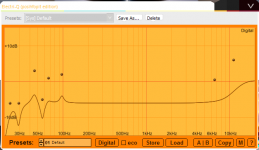


Please continue to show off.
🙂
I asked here at the beginning of the thread how to set up EQ based on parameters if that was possible but no takers. Maybe it was elsewhere, I have forgotten.
Right now I'm between setups meaning that what I use is either small for private listening like a radio (but with audio streams instead of broadcast) or not setup for true stereo music listening but with larger speakers used for movies.
The Foobar thread should address some those techniques and how they do or don't work.
For instance: If I have a Fostex FE167e is there a group of parametric presets to use just for that or in a particular build? That's the sort of thing that digital tweaking should do.
🙂
I asked here at the beginning of the thread how to set up EQ based on parameters if that was possible but no takers. Maybe it was elsewhere, I have forgotten.
Right now I'm between setups meaning that what I use is either small for private listening like a radio (but with audio streams instead of broadcast) or not setup for true stereo music listening but with larger speakers used for movies.
The Foobar thread should address some those techniques and how they do or don't work.
For instance: If I have a Fostex FE167e is there a group of parametric presets to use just for that or in a particular build? That's the sort of thing that digital tweaking should do.
@technofreack: i'm curios at what your window controls looks like, is it a particular VST host or just a replacer for the windows theme?

Thanks for the heads up on the Electri-Q. Tried it a few years ago but they didn't have a free version back then, AFAIK. Now that I've moved on from Fubar to JRiver, I'll have to see if I can getting it running there via VST.
Panomaniac,
How is JRiver superior? Are you talking about the way it handles musics or audio?
Foobar plays Ogg files which one of my streaming music sources has available. I am prob'ly not taking full advantage of Ogg but I get good playback with it.
How is JRiver superior? Are you talking about the way it handles musics or audio?
Foobar plays Ogg files which one of my streaming music sources has available. I am prob'ly not taking full advantage of Ogg but I get good playback with it.
Last edited:

Problem with Foobar 2000
I've been having an issue with Foobar 2000 that, hopefully, someone can provide some assistance with. When I highlight a number of songs to play, then right click and select "Play in Foobar 2000," the songs attempt to load, but the application kind of speeds through all of them quickly and only the last one in the list shows. It's like all the songs are consecutively loaded in "slot" one and over-written by the next one. If I choose "Enqueue in Foobar 2000," everything works correctly.
Any ideas???
Thanks,
Mike
I've been having an issue with Foobar 2000 that, hopefully, someone can provide some assistance with. When I highlight a number of songs to play, then right click and select "Play in Foobar 2000," the songs attempt to load, but the application kind of speeds through all of them quickly and only the last one in the list shows. It's like all the songs are consecutively loaded in "slot" one and over-written by the next one. If I choose "Enqueue in Foobar 2000," everything works correctly.
Any ideas???
Thanks,
Mike
Please continue to show off.
🙂
I asked here at the beginning of the thread how to set up EQ based on parameters if that was possible but no takers. Maybe it was elsewhere, I have forgotten.
Right now I'm between setups meaning that what I use is either small for private listening like a radio (but with audio streams instead of broadcast) or not setup for true stereo music listening but with larger speakers used for movies.
The Foobar thread should address some those techniques and how they do or don't work.
For instance: If I have a Fostex FE167e is there a group of parametric presets to use just for that or in a particular build? That's the sort of thing that digital tweaking should do.
If I understand your question correctly, then yes, you can have separate presets for every driver in different enclosures and in different rooms - that of course expects that you can measure your speakers and apply EQ accordingly. This is how I do it; I have made a basic EQ curve that includes HF horn correction and 23 Hz 48 dB/oct Butterworth highpass, if I move my system to elsewhere (e.g. a party outside or in a small hall) I adjust this basic EQ accordingly to suit different situations and might export these settings for future use.
@technofreack: i'm curios at what your window controls looks like, is it a particular VST host or just a replacer for the windows theme?
Just a windows theme. I don't like this XP default "plastic" GUI and classic theme bored me out too.
And this thread should really be in PC based forum.
I'm back in this thread and trying to get a moderator to straighten out where the thread should be since I went to pc based first and made a posting error.
I'm going through the setup again and found some dead links and my post addresses how to set up here in 2012 from scratch.
I'm going through the setup again and found some dead links and my post addresses how to set up here in 2012 from scratch.

Thanks loninappleton,
I just loaded Foobar2000 a couple of days ago and this thread will be very helpful.
I just loaded Foobar2000 a couple of days ago and this thread will be very helpful.
Thanks loninappleton,
I just loaded Foobar2000 a couple of days ago and this thread will be very helpful.
I have not seen a moderator in here to address moving the thread to PC tools for speakers. Bob Brines has another thread related to Foobar and he is one of the expert builders on the forum.
In my efforts to set up Fb2k again I cannot locate a simple download link to VST Classic EQ. I had the page but it was so full of "download" icons I never did find it. As I said, some links above are dead and so it's like rebuilding the thread now. (Many websites are using too much advertising.)
In any case you will find a lot of useful things with Foobar and VST plug ins.
Fb2k has many flashy skins as well but I only use the raw version.
Last edited:
Catching up to date here I have found a good tutorial which describes the step I missed in reinstalling Foobar and the VST wrapper with plugins:
You’ve found Ed’s site. Foobar, and VST plugins.
It shows with screen shots each step in getting VST going. The step I missed was creating a plugin folder separate from the components folder which holds the VST wrapper by George Yohng.
You’ve found Ed’s site. Foobar, and VST plugins.
It shows with screen shots each step in getting VST going. The step I missed was creating a plugin folder separate from the components folder which holds the VST wrapper by George Yohng.
- Status
- Not open for further replies.
- Home
- Source & Line
- Digital Line Level
- foobar audio player how-to thread