
Sound Card Based Audio Test & Measurement System, 21-day fully functional Free Trial!
Hello, every one, I would like to introduce our flagship product "Multi-Instrument" software here. With this software, a good sound card, and one or two sensors (e.g. measurement mic, or probe, etc.), you can easily form a quality multi-functional test & measurment system. The software is FREE to download and try with full functionality for 21 days at: http://www.virtins.com or http://www.multi-instrument.com.
Introduction
Almost every PC or Pocket PC have a built-in sound card. Sound cards are usually treated as an audio input and output devices for recording, synthesizing, and replaying speech, music and songs. However, sound cards can do more than that.
From instrumentation and control point of view, a sound Card is a dual-channel A/D and dual-channel D/A device, which has a flat frequency response in audio frequency range and has a sampling rate of up to 192kHz, sampling depth of up to 24 bits. Even without any external attenuation circuit, it is able to measure a signal from down to 1 uV to 1V, thanks to its built-in gain control (e.g. Mic Boost, Mic Volume and Line Volume).
Measurement accuracy depends on its hardware quality. Normally, an internal standalone sound card is better than an on-board sound card (chip), and an external sound card is the best. Professional grade sound card is better than consumer grade sound card. In terms of price, even the professional grade
sound card is much cheaper (a few times normally) than its peers in A/D and D/A cards.
Using an external sound card can avoid the interference within the enclosure of the computer casing. A professional sound card can be as good as a professional AD or DA card for test and measurement in audio frequency range. A good article in "Test & Measurement World"
(http://www.tmworld.com/article/CA187380.html) has conducted a comparison test between an old 16-bit Creative Labs Sound Blaster AWE-32 and a 16-bit ADC National Instruments PCI MIO-16XE-10, the result shows that in the THD measurement which requires high precision and accuracy, the results measured by both cards are comparable.
The accuracy of the clock reference is 0.00x% typically for an ordinary sound card. For example, a 0.002%'s inaccuracy in a sampling rate of 44100 Hz means an error of only 0.88Hz. The noise level of a good sound card can be below -110dB, THD below 0.001%.
So, what can be measured by a sound card. Well, it can measure any signal perfectly within audio frequency range, like vibration signal, rotational speed, heat and Lung sound, ECG....., depending on the sensor used, and of course, depending on the software used.
Product Description
Product Website: http://www.virtins.com
Download PC version: http://www.virtins.com/MIsetup.exe
Download Pocket PC version: http://www.virtins.com/PocketINSSetup.exe
Video Demo: http://www.youtube.com/watch?v=S9HAENzC7qw
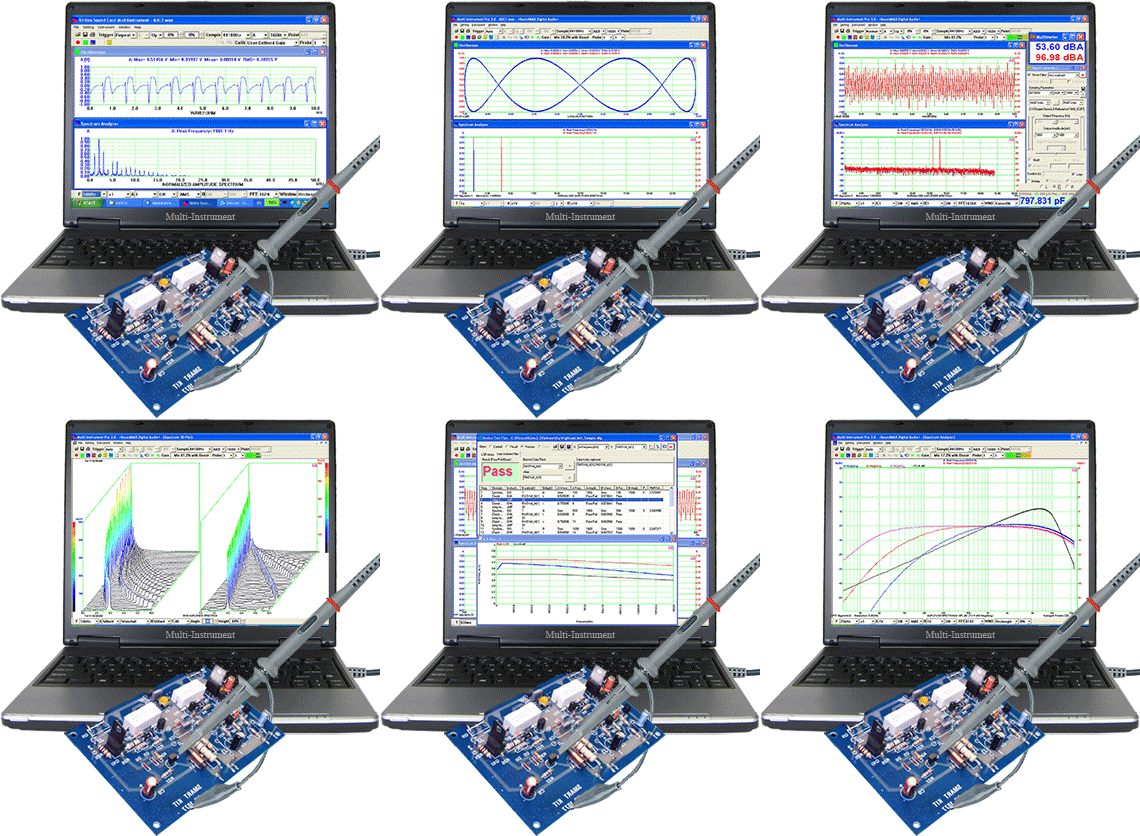
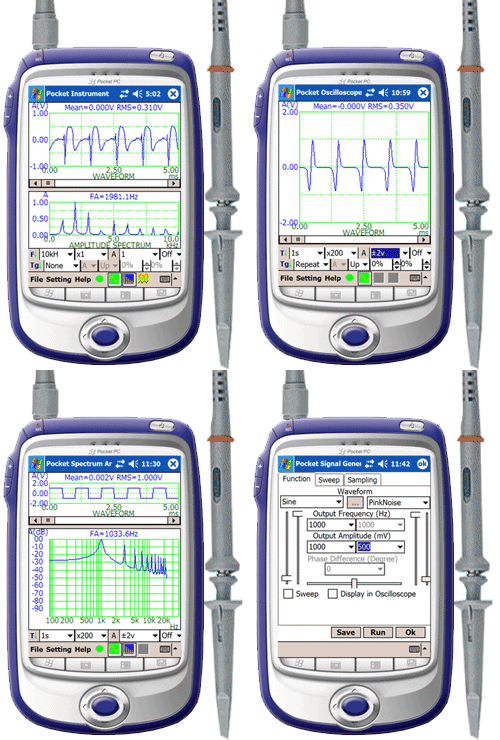
Multi-Instrument is a powerful sound card based multi-function virtual instrument software. It features a specially designed data acquisition approach, which is able to monitor the input signal continuously without missing any trigger event before a frame of data is collected. It has a very fast screen refresh rate (typically greater than 50 frames per second). It supports sophisticated triggering method including pre-trigger and post-trigger,level trigger and differential trigger. It Supports 8, 16, 24 bits and multilingual user interface, including English, French, German, Italian, Spanish, Portuguese, Russian, Simplified Chinese, Traditional Chinese, Japanese, and Korean.
A comprehensive range of functions are provided, including:
(1) Oscilloscope
Dual-trace waveform, Waveform addition and subtraction, Lissajous Pattern, transient/long-time signal recording, voltmeter. Various digital filters are supported.
(2) Spectrum Analyzer
RMS amplitude spectrum, relative amplitude spectrum, octave analysis (1/1,1/3,1/6,1/12,1/24), frequency compensation, frequency weighting (A,B,C,ITU-R 468), peak hold, averaging, measurement of THD, THD+N, SNR, SINAD, Noise Level, IMD, Bandwidth and Crosstalk, phase spectrum, auto correlation function, cross correlation function, coherence function, transfer function (Bode plot), impulse response. Support 55 window functions and window overlap.
(3) Signal Generator
Function generation, multitone generation, arbitrary waveform generation, burst tone generation, MLS generation, DTMF generation, musical scale generation, white noise and pink noise generation, and frequency/amplitude sweep. Synchronized operation between the signal generator and the oscilloscope is supported.
(4) Multimeter
Voltmeter, sound pressure level meter(dB, dBA, dBB, dBC), frequency counter, RPM meter, counter, duty cycle meter, F/V converter. The counter trigger level and hysteresis can be adjusted.
(5) Spectrum 3D Plot
It is used to trace the spectrum variation with time. Two types of plots are provided: waterfall and spectrogram, with adjustable tilt angle of T axis, adjustable height of Y axis, and selectable color palettes.
(6) Data Logger
It provides long time data logging function for 93 derived variables, including RMS value, Peak Frequency, Sound Pressure Level, RPM, THD, etc. Up to eight data logger windows can be opened and each window can trace up to 8 variables. The logged data files can be reloaded into the data logger for review.
(7) LCR meter
It is used to measure the value of an inductor, a capacitor or a resistor, or the impedance of a network of them.
(8) Device Test Plan
Device Test Plan provides a mechanism for you to configure and conduct your own device test steps. It takes the advantage of the sound card's capability of simultaneous input & output, to generate a stimulus to the Device Under Test (DUT) and acquire the response from that device at the same time. Different stimuli can be generated and the response can be analyzed in different ways. It supports 13 instructions with corresponding parameters.
System Requirement
PC or Laptop with 8, 16 or 24 bit Windows compatible sound card, Microsoft Windows95 or greater, Microsoft NT or greater. Screen resolution is recommended to be greater than 800 x 600 pixels.
Hardware Recommendation
Recommended Probe: VIRTINS Sound Card Oscilloscope Probe Kit P601PC
Recommended Measurement Microphone: Behringer ECM8000 ......
Recommended Sound Cards: E-MU Tracker Pre, MicPort Pro, MicMate, MicMate Pro.........
Price
The software license has many levels with price ranging from US$24.95 to US$499.95
Hello, every one, I would like to introduce our flagship product "Multi-Instrument" software here. With this software, a good sound card, and one or two sensors (e.g. measurement mic, or probe, etc.), you can easily form a quality multi-functional test & measurment system. The software is FREE to download and try with full functionality for 21 days at: http://www.virtins.com or http://www.multi-instrument.com.
Introduction
Almost every PC or Pocket PC have a built-in sound card. Sound cards are usually treated as an audio input and output devices for recording, synthesizing, and replaying speech, music and songs. However, sound cards can do more than that.
From instrumentation and control point of view, a sound Card is a dual-channel A/D and dual-channel D/A device, which has a flat frequency response in audio frequency range and has a sampling rate of up to 192kHz, sampling depth of up to 24 bits. Even without any external attenuation circuit, it is able to measure a signal from down to 1 uV to 1V, thanks to its built-in gain control (e.g. Mic Boost, Mic Volume and Line Volume).
Measurement accuracy depends on its hardware quality. Normally, an internal standalone sound card is better than an on-board sound card (chip), and an external sound card is the best. Professional grade sound card is better than consumer grade sound card. In terms of price, even the professional grade
sound card is much cheaper (a few times normally) than its peers in A/D and D/A cards.
Using an external sound card can avoid the interference within the enclosure of the computer casing. A professional sound card can be as good as a professional AD or DA card for test and measurement in audio frequency range. A good article in "Test & Measurement World"
(http://www.tmworld.com/article/CA187380.html) has conducted a comparison test between an old 16-bit Creative Labs Sound Blaster AWE-32 and a 16-bit ADC National Instruments PCI MIO-16XE-10, the result shows that in the THD measurement which requires high precision and accuracy, the results measured by both cards are comparable.
The accuracy of the clock reference is 0.00x% typically for an ordinary sound card. For example, a 0.002%'s inaccuracy in a sampling rate of 44100 Hz means an error of only 0.88Hz. The noise level of a good sound card can be below -110dB, THD below 0.001%.
So, what can be measured by a sound card. Well, it can measure any signal perfectly within audio frequency range, like vibration signal, rotational speed, heat and Lung sound, ECG....., depending on the sensor used, and of course, depending on the software used.
Product Description
Product Website: http://www.virtins.com
Download PC version: http://www.virtins.com/MIsetup.exe
Download Pocket PC version: http://www.virtins.com/PocketINSSetup.exe
Video Demo: http://www.youtube.com/watch?v=S9HAENzC7qw
Multi-Instrument is a powerful sound card based multi-function virtual instrument software. It features a specially designed data acquisition approach, which is able to monitor the input signal continuously without missing any trigger event before a frame of data is collected. It has a very fast screen refresh rate (typically greater than 50 frames per second). It supports sophisticated triggering method including pre-trigger and post-trigger,level trigger and differential trigger. It Supports 8, 16, 24 bits and multilingual user interface, including English, French, German, Italian, Spanish, Portuguese, Russian, Simplified Chinese, Traditional Chinese, Japanese, and Korean.
A comprehensive range of functions are provided, including:
(1) Oscilloscope
Dual-trace waveform, Waveform addition and subtraction, Lissajous Pattern, transient/long-time signal recording, voltmeter. Various digital filters are supported.
(2) Spectrum Analyzer
RMS amplitude spectrum, relative amplitude spectrum, octave analysis (1/1,1/3,1/6,1/12,1/24), frequency compensation, frequency weighting (A,B,C,ITU-R 468), peak hold, averaging, measurement of THD, THD+N, SNR, SINAD, Noise Level, IMD, Bandwidth and Crosstalk, phase spectrum, auto correlation function, cross correlation function, coherence function, transfer function (Bode plot), impulse response. Support 55 window functions and window overlap.
(3) Signal Generator
Function generation, multitone generation, arbitrary waveform generation, burst tone generation, MLS generation, DTMF generation, musical scale generation, white noise and pink noise generation, and frequency/amplitude sweep. Synchronized operation between the signal generator and the oscilloscope is supported.
(4) Multimeter
Voltmeter, sound pressure level meter(dB, dBA, dBB, dBC), frequency counter, RPM meter, counter, duty cycle meter, F/V converter. The counter trigger level and hysteresis can be adjusted.
(5) Spectrum 3D Plot
It is used to trace the spectrum variation with time. Two types of plots are provided: waterfall and spectrogram, with adjustable tilt angle of T axis, adjustable height of Y axis, and selectable color palettes.
(6) Data Logger
It provides long time data logging function for 93 derived variables, including RMS value, Peak Frequency, Sound Pressure Level, RPM, THD, etc. Up to eight data logger windows can be opened and each window can trace up to 8 variables. The logged data files can be reloaded into the data logger for review.
(7) LCR meter
It is used to measure the value of an inductor, a capacitor or a resistor, or the impedance of a network of them.
(8) Device Test Plan
Device Test Plan provides a mechanism for you to configure and conduct your own device test steps. It takes the advantage of the sound card's capability of simultaneous input & output, to generate a stimulus to the Device Under Test (DUT) and acquire the response from that device at the same time. Different stimuli can be generated and the response can be analyzed in different ways. It supports 13 instructions with corresponding parameters.
System Requirement
PC or Laptop with 8, 16 or 24 bit Windows compatible sound card, Microsoft Windows95 or greater, Microsoft NT or greater. Screen resolution is recommended to be greater than 800 x 600 pixels.
Hardware Recommendation
Recommended Probe: VIRTINS Sound Card Oscilloscope Probe Kit P601PC
Recommended Measurement Microphone: Behringer ECM8000 ......
Recommended Sound Cards: E-MU Tracker Pre, MicPort Pro, MicMate, MicMate Pro.........
Price
The software license has many levels with price ranging from US$24.95 to US$499.95
Thank you for trying the software.
It works on many Windows Vista PCs. See a screen shot of Multi-Instrument 3.0 working under Windows Vista here.
http://wwww.virtins.com/temp/Sine10kSR192k.gif
Please check your Windows Recording Control to make sure that at least one of the input source is enabled.
It works on many Windows Vista PCs. See a screen shot of Multi-Instrument 3.0 working under Windows Vista here.
http://wwww.virtins.com/temp/Sine10kSR192k.gif
Please check your Windows Recording Control to make sure that at least one of the input source is enabled.
Thanks for the reply.
I am not surprised that it works on some Vista installations, that is a common scenario with many applications that are not fully Vista compliant, it all depends on the hardware and drivers present on the individual PC.
I can confirm that I can play and record with many other applications (even CoolEdit!) without any problems. I can also confirm that the application works fine if I run XP on the same machine.
In any event, surely if there was a problem with there not being a record source enabled that should result in an error message and a suggestion to enable a source rather than just a crash with no error message.
I would be happy to assist in tracking down the source of the error if you would like to persue this issue.
Cheers.
I am not surprised that it works on some Vista installations, that is a common scenario with many applications that are not fully Vista compliant, it all depends on the hardware and drivers present on the individual PC.
I can confirm that I can play and record with many other applications (even CoolEdit!) without any problems. I can also confirm that the application works fine if I run XP on the same machine.
In any event, surely if there was a problem with there not being a record source enabled that should result in an error message and a suggestion to enable a source rather than just a crash with no error message.
I would be happy to assist in tracking down the source of the error if you would like to persue this issue.
Cheers.
There are some major changes in the Recording Control under Windows Vista, which may cause some imcompatibility issues for audio related programs.
Windows Vista is able to automatically detect whether an audio input endpoint (e.g. Mic or Line In) is plugged in or not. It is also possible to disable an audio input endpoint via Recording Control under Windows Control Panel.
For Multi-Instrument 3.0, if all the available input endpoints (e.g. mic, line in, ....) in the Recording Control of Windows Vista are disabled or are detected as "Not Plugged In", then Multi-Instrument may not function correctly because the software will start to acquire data from the default sound card which does not "exist" in Windows Vista context (either diaabled or unplugged). This situation has been handled more gracefully in Multi-Instrument 3.1 which is coming soon. To work around this problem in Multi-Instrument 3.0, make at least one input endpoint available before you start the program.
Could the above situation be your case? By the way, Multi-Instrument 3.0 works with sound card MME driver only, which is the standard driver for sound cards under Windows.
Windows Vista is able to automatically detect whether an audio input endpoint (e.g. Mic or Line In) is plugged in or not. It is also possible to disable an audio input endpoint via Recording Control under Windows Control Panel.
For Multi-Instrument 3.0, if all the available input endpoints (e.g. mic, line in, ....) in the Recording Control of Windows Vista are disabled or are detected as "Not Plugged In", then Multi-Instrument may not function correctly because the software will start to acquire data from the default sound card which does not "exist" in Windows Vista context (either diaabled or unplugged). This situation has been handled more gracefully in Multi-Instrument 3.1 which is coming soon. To work around this problem in Multi-Instrument 3.0, make at least one input endpoint available before you start the program.
Could the above situation be your case? By the way, Multi-Instrument 3.0 works with sound card MME driver only, which is the standard driver for sound cards under Windows.
>There are some major changes in the Recording Control under Windows Vista, which may cause some imcompatibility issues for audio related programs.
Indeed there are! and that is why I am saying that your application is not Vista compatible.
Never-the-less I can confirm that applications that use the mme api (wave api) work perfectly on my system.
I can also confirm that a record input (in my case line-input) is defined and enabled and working perfectly (it is perfectly obvious that your software would not work unless this was available and so all of this was set up before installation, in fact this is the normal arrangement on my PC)
Cheers,
Gary
Indeed there are! and that is why I am saying that your application is not Vista compatible.
Never-the-less I can confirm that applications that use the mme api (wave api) work perfectly on my system.
I can also confirm that a record input (in my case line-input) is defined and enabled and working perfectly (it is perfectly obvious that your software would not work unless this was available and so all of this was set up before installation, in fact this is the normal arrangement on my PC)
Cheers,
Gary
Thanks for the info. When you start the trial program, you should see the activation dialog pop up and then you need to press the continue button to enter the program. Did you see this activation dialog before it crashes? Did it crash with Error Code 0x00000005? Thanks.
This may have some thing to do with the installation and the software copy-protection method we used. The software must be installed with admin right. It can then be accessed by any user including restricted users and guests.
Was this a brand new installation and no residual files from the previous version exisited there when you installed the current version?
What if you go to the directory of the software and run MIs.exe directly?
What if you go to the directory of the software and run MIu.exe directly?
What if you go to the directory of the software and run MIs.exe directly?
What if you go to the directory of the software and run MIu.exe directly?
Thanks for the reply.
I have installed over a previous installation in an attempt to get it to work, however the previous installation exhibited the identical symptom
same result
same result
VIRTINS said:Was this a brand new installation and no residual files from the previous version exisited there when you installed the current version?
I have installed over a previous installation in an attempt to get it to work, however the previous installation exhibited the identical symptom
VIRTINS said:What if you go to the directory of the software and run MIs.exe directly?
same result
VIRTINS said:What if you go to the directory of the software and run MIu.exe directly?
same result
Thank you for the information.
1. Any special virus protection software on your computer which might prevent the program from running by mistake?
2. What if you turn on the "Scroll Lock" button in your keyboard and then run the software? Will the activation dialog pop up?
3. If you go to Windows Task Manager, do you see any MI.exe running on the background in the Processes window?
4. Any error message (including the one from Windows) when the program crashes?
1. Any special virus protection software on your computer which might prevent the program from running by mistake?
2. What if you turn on the "Scroll Lock" button in your keyboard and then run the software? Will the activation dialog pop up?
3. If you go to Windows Task Manager, do you see any MI.exe running on the background in the Processes window?
4. Any error message (including the one from Windows) when the program crashes?
VIRTINS said:Thank you for the information.
1. Any special virus protection software on your computer which might prevent the program from running by mistake?
I use AVG and have tried tunning MI with the residentshield turned off - same result.
VIRTINS said:2. What if you turn on the "Scroll Lock" button in your keyboard and then run the software? Will the activation dialog pop up?
same result
VIRTINS said:3. If you go to Windows Task Manager, do you see any MI.exe running on the background in the Processes window?
No
VIRTINS said:4. Any error message (including the one from Windows) when the program crashes?
see attached image and this:
Problem signature
Problem Event Name: APPCRASH
Application Name: MIs.exe
Application Version: 3.0.0.0
Application Timestamp: 47869060
Fault Module Name: StackHash_7dc0
Fault Module Version: 0.0.0.0
Fault Module Timestamp: 00000000
Exception Code: 80000004
Exception Offset: 00980777
OS Version: 6.0.6001.2.1.0.768.2
Locale ID: 3081
Additional Information 1: 7dc0
Additional Information 2: b4ee5de6a2322745523997a782b35692
Additional Information 3: 027b
Additional Information 4: 277e19c30fbd5f6bb531ec9e027c37c3
Attachments

Thank you for the information.
The problem has something to do with the copy-protection software from another company as well as the particular Windows Settings on your computer. We will consult them to see whether they can help in this matter.
The problem has something to do with the copy-protection software from another company as well as the particular Windows Settings on your computer. We will consult them to see whether they can help in this matter.
Thanks.
If you can let me know what the "particular windows settings" on my computer are I would appreciate that also.
Cheers
If you can let me know what the "particular windows settings" on my computer are I would appreciate that also.
Cheers
Thank you for your interest in our products again.
We have just released V3.1 on our website, you can download it now at: www.virtins.com/MIsetup.exe and see whether it works for your case. The new version now supports sound card ASIO driver and a few other ADC/DAC card, such as NI DAQmx.
We are still updating our website to reflect the new changes.
We have just released V3.1 on our website, you can download it now at: www.virtins.com/MIsetup.exe and see whether it works for your case. The new version now supports sound card ASIO driver and a few other ADC/DAC card, such as NI DAQmx.
We are still updating our website to reflect the new changes.
- Status
- Not open for further replies.
- Home
- Vendor's Bazaar
- Sound Card Based Audio Test & Measurement System, 21-day fully functional Free Trial!