
Understood, but my problem is that the baseline does not appear at all even when changing parameters (and therefore power/displacement charts).
Hi StoneT,
I think I might know what is going on here, but to be absolutely sure, could you please export one of your Hornresp records that does not show a baseline, and then post the file as an attachment, similar to the example below. Records are exported by selecting menu File > Export > Hornresp Record.
I need to be able to replicate what you are doing, to confirm what is happening.
Thanks and kind regards,
David
Attachments
Set voltage to 0 to simulate the horn itself.
(Setting Eg = 0 gives the driver diaphragm a constant rms velocity of 10 centimetres per second at all frequencies).
Set voltage to 0 to simulate the horn itself.
Thanks I try.
Wil do a horn system with a Tapped horn as a sub, 3 way system.
tapped horn active rest passive.
regards
When I went to do this the first one is now working again but this one isn't:
Here we go:
Don't laugh, it's a work in progress 🙄
Hi StoneT,
FYI: Suggestion: Move the Stuffing away from the Port Area!
🙂b
Attachments

When I went to do this the first one is now working again but this one isn't:
Hi StoneT,
Thanks for posting the export file, it has enabled me to confirm my suspicions.
The baseline is missing because the technique I use to trap invalid absorbent filling material results (in addition to simply restricting the frequency range to 2000 hertz) has not worked as it should for the example you have provided. See Post #3924 for information on the limitations of the absorbent material model.
Strictly speaking this is not a bug, but rather a shortcoming in the method I use to trap invalid results.
Your post has prompted me to see if I can come up with a more robust way of trapping filling material calculation errors by taking a different approach to the problem. The early signs are encouraging, and I will keep you advised of progress.
Thanks for raising this issue.
Kind regards,
David

Now this sounds interesting. Refinements.
Great news that you are working towards a solution David.
Great news that you are working towards a solution David.

Now this sounds interesting. Refinements.
Great news that you are working towards a solution David.
Yeah, this thing gets better so fast sometimes.
I fully expect to open this thread one day and see that a folding wizard with dimension constraints in a 3D window has been added 😛
Hi StoneT,
Further testing has revealed that under certain circumstances, the proposed new approach also has problems in trapping invalid absorbent filling results.
During this further testing however, I discovered an oversight in the code for the existing method, which when rectified, fortuitously addresses the problem you have been experiencing.
When the fix is implemented, the error in the test record you provided is correctly detected, and the "Fr1 is too large" message is displayed as intended, rather than a chart result being shown without a baseline also being generated.
Note that in the case of your specific test example, because the error is in the saved record, no baseline is generated because it would be invalid. Even when the error is manually corrected, it will still be necessary to press the Ctrl+Alt+B keys to save a new baseline for use in the current session. This is a "one-off" situation however, and would not normally occur in practice because a user is unlikely to knowingly save a record containing an absorbent filling error in the first place.
Thanks again for reporting this problem.
Kind regards,
David
Your post has prompted me to see if I can come up with a more robust way of trapping filling material calculation errors by taking a different approach to the problem. The early signs are encouraging, and I will keep you advised of progress.
Further testing has revealed that under certain circumstances, the proposed new approach also has problems in trapping invalid absorbent filling results.
During this further testing however, I discovered an oversight in the code for the existing method, which when rectified, fortuitously addresses the problem you have been experiencing.
When the fix is implemented, the error in the test record you provided is correctly detected, and the "Fr1 is too large" message is displayed as intended, rather than a chart result being shown without a baseline also being generated.
Note that in the case of your specific test example, because the error is in the saved record, no baseline is generated because it would be invalid. Even when the error is manually corrected, it will still be necessary to press the Ctrl+Alt+B keys to save a new baseline for use in the current session. This is a "one-off" situation however, and would not normally occur in practice because a user is unlikely to knowingly save a record containing an absorbent filling error in the first place.
Thanks again for reporting this problem.
Kind regards,
David
Attachments

Last edited:
Hornresp Update 3480-140728
Hi Everyone,
CHANGE
The "missing baseline" problem identified in Post #4714 has now been fixed. My thanks to StoneT for reporting this issue.
Kind regards,
David
Hi Everyone,
CHANGE
The "missing baseline" problem identified in Post #4714 has now been fixed. My thanks to StoneT for reporting this issue.
Kind regards,
David
I fully expect to open this thread one day and see that a folding wizard with dimension constraints in a 3D window has been added 😛
Hi DrDyna,
That is DEFINITELY NEVER going to happen!
A nice challenging project for someone else to tackle, perhaps 🙂.
(I did look at trying to come up with a Folding Wizard some time ago, but gave up - it was just too difficult to cover all the possible configurations).
Kind regards,
David
How's that for a development turnaround people!
David your dedication to this program and the DIY audio community amazes me!
Long may you keep up the good work.
(so long as you are enjoying it and the rest of your life isn't suffering of course😉)
David your dedication to this program and the DIY audio community amazes me!
Long may you keep up the good work.
(so long as you are enjoying it and the rest of your life isn't suffering of course😉)
(so long as you are enjoying it and the rest of your life isn't suffering of course😉)
Hi StoneT,
Rest assured, I wouldn't continue to work on Hornresp if I didn't enjoy it 🙂.
Kind regards,
David
Hi Everyone,
I have no idea why, but the Norton WS.Reputation.1 problem seems to have now fixed itself.
Kind regards,
David
Unfortunately it seems that with the latest release of Hornresp, the Norton WS.Reputation.1 problem has returned.
I have no idea why, but the Norton WS.Reputation.1 problem seems to have now fixed itself.
Kind regards,
David
Maybe Norton have given up monitoring because you update the software too often for them to keep up !
Hi DrDyna,
That is DEFINITELY NEVER going to happen!
A nice challenging project for someone else to tackle, perhaps 🙂.
(I did look at trying to come up with a Folding Wizard some time ago, but gave up - it was just too difficult to cover all the possible configurations).
Kind regards,
David
Haha, I expected not! I tried to pick something that would be cool, but at the same time had almost no chance of being added.
It's just something that hits me every time I play a 3D game..with the tech we have now, it just amazes me someone hasn't done it.

Possible enhancement
Hi David,as so many other I enjoy your work and use it for designing lots of stuff. After the addition of everything damping it has become really, really useful.
A couple of things would however be of great help:
1. Would it be possible to have the impulse response calculation take the damping material into account, now that it is stored in the record. I guess that would mean taking damping into account when calculating the combined frequency response and other things (pressing "Calculate" in the main input window)
2. I often miss one more segment, mostly because of special aesthetic considerations of folding etc., unfortunately it is sometimes it is before the driver and sometimes the need is after the driver in an offset driver configuration
I think there is a small bug, if you edit a record and only change the damping, Hornresp doesn't discover that the record was changed, and hence if you are sol silly as to move away from the record, your changes are discarded silently, where Hornresp normally is friendly enough to ask you if you want to save.
Best regards, Kurt
Hi David,as so many other I enjoy your work and use it for designing lots of stuff. After the addition of everything damping it has become really, really useful.
A couple of things would however be of great help:
1. Would it be possible to have the impulse response calculation take the damping material into account, now that it is stored in the record. I guess that would mean taking damping into account when calculating the combined frequency response and other things (pressing "Calculate" in the main input window)
2. I often miss one more segment, mostly because of special aesthetic considerations of folding etc., unfortunately it is sometimes it is before the driver and sometimes the need is after the driver in an offset driver configuration
I think there is a small bug, if you edit a record and only change the damping, Hornresp doesn't discover that the record was changed, and hence if you are sol silly as to move away from the record, your changes are discarded silently, where Hornresp normally is friendly enough to ask you if you want to save.
Best regards, Kurt
is it not possible to edit a post?
anyway, downloaded and installed the latest version today. no spl response option. funny thing was i actually ended up here to say thanks again for the program!!! lots of folks on avs are using it that will never make their way over here. i post under the callsign ltd02 over there. anyway, is there a previous version that i can update to while this little bug is sorted out? previously, i was running v28 or so.
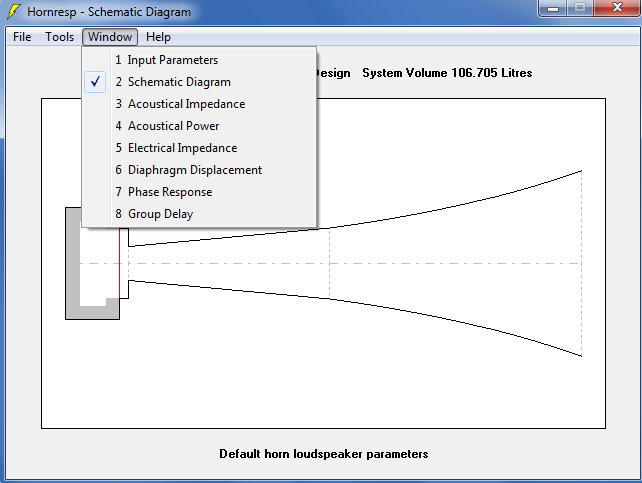
anyway, downloaded and installed the latest version today. no spl response option. funny thing was i actually ended up here to say thanks again for the program!!! lots of folks on avs are using it that will never make their way over here. i post under the callsign ltd02 over there. anyway, is there a previous version that i can update to while this little bug is sorted out? previously, i was running v28 or so.
Attachments

- Home
- Loudspeakers
- Subwoofers
- Hornresp