
I just purchased a used Crown Com-tech 400 amplifier and after hooking up 2 JBL HSL410's (that work), I noticed that channel 1 is pretty much dead. I am getting a small bit of noise out of the speaker on channel 1 when I play music, however it is barely noticeable and garbled.
I hooked up my equipment in this order:
Computer (Creative X-Fi Titanium)->Com-tech 400->(HSL410's/ Jamo Sub 250- in parallel)
Note that my Jamo Sub has line-level inputs for amps that do not have a sub out. I have tried disconnecting the sub and reversing the polarity on the speaker wires on channel 1 to no avail.
My regular powered computer speakers also work well so this can't be an issue with my sound card. I also double-checked all of the input and output wiring on the amp. I originally had the input wiring connected incorrectly (positive in + and negative in the ground terminal), however I fixed the wiring when I moved the negative wires over to the (-) input terminals of the amp.
I am using regular Radioshack Megacable speaker cable by the way. Please let me know if I am missing any information.
What is the most likely cause of this problem? I don't mind opening up the amp and replacing components, however I am having difficulty finding where to start.
Also, please let me know if I should replace anything (like op-amps) while working on the amp to improve sound quality on both channels. If you would like any pictures of the circuit board, please let me know.
Thanks for the help.
I hooked up my equipment in this order:
Computer (Creative X-Fi Titanium)->Com-tech 400->(HSL410's/ Jamo Sub 250- in parallel)
Note that my Jamo Sub has line-level inputs for amps that do not have a sub out. I have tried disconnecting the sub and reversing the polarity on the speaker wires on channel 1 to no avail.
My regular powered computer speakers also work well so this can't be an issue with my sound card. I also double-checked all of the input and output wiring on the amp. I originally had the input wiring connected incorrectly (positive in + and negative in the ground terminal), however I fixed the wiring when I moved the negative wires over to the (-) input terminals of the amp.
I am using regular Radioshack Megacable speaker cable by the way. Please let me know if I am missing any information.
What is the most likely cause of this problem? I don't mind opening up the amp and replacing components, however I am having difficulty finding where to start.
Also, please let me know if I should replace anything (like op-amps) while working on the amp to improve sound quality on both channels. If you would like any pictures of the circuit board, please let me know.
Thanks for the help.
I know that bumping threads is frowned upon in many forums, however I disassembled my amp and noticed a blown resistor...
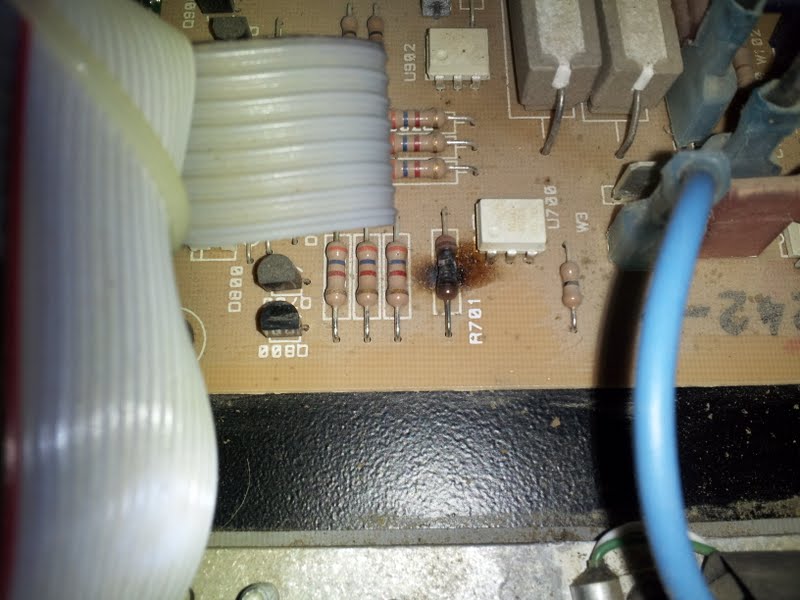
Do you think that I should replace this resistor and power my amp back up or do you think this might be a sign of more serious problems like leaking capacitors? I checked all of the capacitors that I could find but I didn't see any leaking ones.
Also, I checked the Schematic from Crown and noticed that this resistor (R701) is on the power control board. Please see page two on the following pdf:
http://www.crownaudio.com/pdf/legacy/ct400_main.pdf
Thanks
Do you think that I should replace this resistor and power my amp back up or do you think this might be a sign of more serious problems like leaking capacitors? I checked all of the capacitors that I could find but I didn't see any leaking ones.
Also, I checked the Schematic from Crown and noticed that this resistor (R701) is on the power control board. Please see page two on the following pdf:
http://www.crownaudio.com/pdf/legacy/ct400_main.pdf
Thanks
Attachments

Last edited:

The optoisolator (U700) and triac (Q701) should be checked (or repaced) as well. My guess is the triac gate is shorted, damaging the driver and the resistor. Less than $10 in parts.
The optoisolator (U700) and triac (Q701) should be checked (or repaced) as well. My guess is the triac gate is shorted, damaging the driver and the resistor. Less than $10 in parts.
DJK,
Thanks for the suggestion! I just purchased 2 new optoisolators and triacs (mac224a-4 wasn't available anymore, however I purchased an equivalent part). Considering that one triac failed, I thought that it would be good to replace both with new parts rather than risk another failure.
I also purchased new Nichicon and Panasonic capacitors to replace all of the electrolytic ones on the amp. I am having trouble finding capacitors to replace the 2 large 6300uf 200v capacitors however. This type is missing even on Mouser and Digikey! Do you think that it's worth paying around $45 for each replacement (if I can find any)?
Also, the sound coming out of the working channel wasn't the best. Should I check and adjust the ODEPs? Should I also thoroughly clean out the inside of my amp? (it's very dusty) Finally, do most people clean out POTs with contact cleaner?
I apologize for all of the questions, but I would like to restore my amp to like-new condition.
Thanks
A 150V cap will do for 70V mode, a 75V cap will do if you only run it in 8/4Ω mode (and never run it in 70V mode). I wouldn't replace these unless they're all dried up. I would tack a 22µF in parallel with each.
C100, C153 are in the signal path. Parallel C100 with a small value film type, use a good film type for C153.
I'm not sure how good the MC33079 is, or what would be a suitable replacement. It's not horrible, I would do the caps first and then give it a listen.
I wouldn't fool with the ODEP unless its had some work done on the output stages.
I clean pots, switches, and connectors with Caig De-Oxit, it can make a huge sonic improvement.
I just bought a couple of 210s and an 810, but I haven't had time to listen to them just yet. Maybe in a couple of weeks.
C100, C153 are in the signal path. Parallel C100 with a small value film type, use a good film type for C153.
I'm not sure how good the MC33079 is, or what would be a suitable replacement. It's not horrible, I would do the caps first and then give it a listen.
I wouldn't fool with the ODEP unless its had some work done on the output stages.
I clean pots, switches, and connectors with Caig De-Oxit, it can make a huge sonic improvement.
I just bought a couple of 210s and an 810, but I haven't had time to listen to them just yet. Maybe in a couple of weeks.
Last edited:
A 150V cap will do for 70V mode, a 75V cap will do if you only run it in 8/4Ω mode (and never run it in 70V mode). I wouldn't replace these unless they're all dried up. I would tack a 22µF in parallel with each.
C100, C153 are in the signal path. Parallel C100 with a small value film type, use a good film type for C153.
I'm not sure how good the MC33079 is, or what would be a suitable replacement. It's not horrible, I would do the caps first and then give it a listen.
I wouldn't fool with the ODEP unless its had some work done on the output stages.
I clean pots, switches, and connectors with Caig De-Oxit, it can make a huge sonic improvement.
I just bought a couple of 210s and an 810, but I haven't had time to listen to them just yet. Maybe in a couple of weeks.
Wow! Are you considered the wizard of amps?
This is probably a dumb question, but does it matter what value of capacitor I parallel with C100? Should I look for something around .5uf?
Also, does increasing the capacitance by paralleling capacitors tend to improve audio quality?
Would a 330 volt suppression film capacitor work well in place of c153? PHE841EB6100MR17 Kemet Suppression Film Capacitors
I've also heard good things about polypropylene capacitors.
Thanks again.
"Wow! Are you considered the wizard of amps? "
Only on Tuesdays, what day is it?
I generally buy 0.1µF in bags of 100 for bypassing caps like C100 and replacing caps like C153, I just get any name brand polypropylene (I ordered some Panasonic the other day).
That suppression cap is quite large, it may be a fit problem. It's also expensive, the caps I ordered the other day ran $12.27 for 100pcs.
Only on Tuesdays, what day is it?
I generally buy 0.1µF in bags of 100 for bypassing caps like C100 and replacing caps like C153, I just get any name brand polypropylene (I ordered some Panasonic the other day).
That suppression cap is quite large, it may be a fit problem. It's also expensive, the caps I ordered the other day ran $12.27 for 100pcs.
Thanks again for the tips.
I actually just finished repairing my Com-tech and the results are amazing. While I cannot say that audio quality has improved at all after installing those new capacitors, both channels ARE working after replacing R701 and Q701.
I wasn't able to find MAC224a-4's anymore, however I did find an industry-standard equivalent... the Littelfuse Q2040k7. I thought that this would just be a plug and play, however the new triacs were in a much bigger package (and isolated) and didn't fit in the stock location so I did some fiddling to get them to work.
I got the wrong capacitors for C100 (I needed to get non-polarized caps and I purchased polarized ones) and I realized that I needed to replace both C153 and C253 (one .1 uf cap for each channel) so I didn't order enough.
Do you think it's worth opening my amp back up just to install caps in parallel at the locations you mentioned?
Also, I discovered that my two MC33079's are installed in sockets! I've heard that National makes a very good OPAMP that could replace mine. What do you think about the LME49740? LME49740 - Quad High Performance, High Fidelity Audio Operational Amplifier
Have you gotten a chance to check out your Crown amps? On mine at least, the audio quality is pretty darn good. I'll need to wait until tomorrow to really boost the volume.
I actually just finished repairing my Com-tech and the results are amazing. While I cannot say that audio quality has improved at all after installing those new capacitors, both channels ARE working after replacing R701 and Q701.
I wasn't able to find MAC224a-4's anymore, however I did find an industry-standard equivalent... the Littelfuse Q2040k7. I thought that this would just be a plug and play, however the new triacs were in a much bigger package (and isolated) and didn't fit in the stock location so I did some fiddling to get them to work.
I got the wrong capacitors for C100 (I needed to get non-polarized caps and I purchased polarized ones) and I realized that I needed to replace both C153 and C253 (one .1 uf cap for each channel) so I didn't order enough.
Do you think it's worth opening my amp back up just to install caps in parallel at the locations you mentioned?
Also, I discovered that my two MC33079's are installed in sockets! I've heard that National makes a very good OPAMP that could replace mine. What do you think about the LME49740? LME49740 - Quad High Performance, High Fidelity Audio Operational Amplifier
Have you gotten a chance to check out your Crown amps? On mine at least, the audio quality is pretty darn good. I'll need to wait until tomorrow to really boost the volume.
Here's another update:
I have noticed a hum from my subwoofer (a Jamo 250) at around 100hz. I have made sure that all of my speaker wires are placed a reasonable distance from my power cords and I have checked to make sure that the amp and subwoofer were plugged into power outlets that were a distance from each other.
Also, I get this hum whenever I have my amp connected to my subwoofer (regardless of whether or not the amp is on). Once I unplug all of the speaker cables to the sub, the hum stops.
I also have the sub connected in parallel to the output connectors on the amp with my 2 speakers since the Com-tech amp doesn't have a sub pass-through connector. Is there something in my Com-tech that might be causing this hum? The subwoofer did not hum when it was connected to the previous owner's receiver at his house.
Thanks
I have noticed a hum from my subwoofer (a Jamo 250) at around 100hz. I have made sure that all of my speaker wires are placed a reasonable distance from my power cords and I have checked to make sure that the amp and subwoofer were plugged into power outlets that were a distance from each other.
Also, I get this hum whenever I have my amp connected to my subwoofer (regardless of whether or not the amp is on). Once I unplug all of the speaker cables to the sub, the hum stops.
I also have the sub connected in parallel to the output connectors on the amp with my 2 speakers since the Com-tech amp doesn't have a sub pass-through connector. Is there something in my Com-tech that might be causing this hum? The subwoofer did not hum when it was connected to the previous owner's receiver at his house.
Thanks
Sry, I keep waiting too long to edit my messages. I wanted to add that I get this hum even when I disconnect the inputs to my amp.
I found out that the building I live in has some poor wiring so my Jamo 250 sub (which does not use a third prong) was grounding out through the speaker wire. I made a grounding cable and grounded the chassis of the sub to an outlet cover mounting screw. Now, I am no longer getting a hum through the subwoofer.
I am still investigating opamp options though!
I am still investigating opamp options though!

I am still investigating opamp options though!
I'm going to try the LME49740 in a Crown D-75A. I hope it's good.
I tried installing the National OPAMPS in my Comtech but I couldn't determine that there weren't any issues since I did not have a scope or other diagnostic equipment. If you get a chance, could you check for stability with the LME49740 in your D-75? The main problem that I can see is that the LME is a much faster OPAMP.
I tried installing the National OPAMPS in my Comtech but I couldn't determine that there weren't any issues since I did not have a scope or other diagnostic equipment. If you get a chance, could you check for stability with the LME49740 in your D-75? The main problem that I can see is that the LME is a much faster OPAMP.
Did you notice any difference in noise or sound quality? I think one sign that it was unstable is that the heatsinks would get really hot just sitting there idling.
The stock op amp is a good unit, just 7v/us slew rate, but very low noise and distortion. The LME49740 is 20V/us.
You can read here:
<meta name="description" content="Klipsch audio systems provide the true audio/video lover a wide variety of high performance loudspeakers and loudspeaker systems for music and home theater entertainment centers, including iPod speakers, multimedia s
about upgrades to a Crown D45.
Dirkwright,
Please check page 6 of the link that you sent me. I do not understand the physics behind it, but I have heard from many people that unless you account for the difference in slew rate between opamps that you can get severe oscillations.
I'd love to put the LME49740 in my Comtech because it's a low-noise, fast opamp but I can't say that it is compatible without the proper test equipment and/or the knowledge to test the amp.
When I installed the LME, the audio did seem to be "cleaner", however it was less full if that makes sense. It seemed like bass was a bit lacking compared to the MC33079. The MC33079 might overemphasize bass however, so I can't say for sure that the LME wasn't working properly.
Do you know how the slew rate of the opamps affects the overall slew rate of the amp? According to Crown specs, the Comtech has a slew rate of 17V/us... I don't know what the slew rate of the D-45 is though.
By the way, do you know if it would make sense to upgrade the large filter capacitors in my Comtech? I'm still using the 17 year old stock 6,300uf 250v capacitors.
Thanks
Please check page 6 of the link that you sent me. I do not understand the physics behind it, but I have heard from many people that unless you account for the difference in slew rate between opamps that you can get severe oscillations.
I'd love to put the LME49740 in my Comtech because it's a low-noise, fast opamp but I can't say that it is compatible without the proper test equipment and/or the knowledge to test the amp.
When I installed the LME, the audio did seem to be "cleaner", however it was less full if that makes sense. It seemed like bass was a bit lacking compared to the MC33079. The MC33079 might overemphasize bass however, so I can't say for sure that the LME wasn't working properly.
Do you know how the slew rate of the opamps affects the overall slew rate of the amp? According to Crown specs, the Comtech has a slew rate of 17V/us... I don't know what the slew rate of the D-45 is though.
By the way, do you know if it would make sense to upgrade the large filter capacitors in my Comtech? I'm still using the 17 year old stock 6,300uf 250v capacitors.
Thanks
Dirkwright,
Please check page 6 of the link that you sent me. I do not understand the physics behind it, but I have heard from many people that unless you account for the difference in slew rate between opamps that you can get severe oscillations.
I'd love to put the LME49740 in my Comtech because it's a low-noise, fast opamp but I can't say that it is compatible without the proper test equipment and/or the knowledge to test the amp.
When I installed the LME, the audio did seem to be "cleaner", however it was less full if that makes sense. It seemed like bass was a bit lacking compared to the MC33079. The MC33079 might overemphasize bass however, so I can't say for sure that the LME wasn't working properly.
Do you know how the slew rate of the opamps affects the overall slew rate of the amp? According to Crown specs, the Comtech has a slew rate of 17V/us... I don't know what the slew rate of the D-45 is though.
By the way, do you know if it would make sense to upgrade the large filter capacitors in my Comtech? I'm still using the 17 year old stock 6,300uf 250v capacitors.
Thanks
Well, I'm trying to get up to speed on SS amps. A long time ago, I repaired, modified, and upgraded old tube gear, as well as designed and built new stuff. Any feedback I used was relatively simple compared to these Crown amps though.
Anyway, Crown has limited the slew rate of the entire D-45 and D-75A amps with various filters and feedback methods that I don't entirely understand. I do know that the input circuit that I have attached shows a low pass filter on the input comprising R202 and C202, which limits the slew rate of the incoming signal. I believe the diodes D209 and D210 clamp the input voltage as well if it's over a certain value. The part of the schematic here doesn't show all of the feedback network, but based on the relatively large number of small capacitors, it looks like it's adequately bypassed for stability. These amps were designed to work in radio stations where there's a lot of EMI and RFI, so they limited the slew rate on purpose. The stock op amp only has a slew rate of 7V/us, for example.
The advantage of going to higher slew rate op amp is to eliminate Transient InterModulation distortion. I'm not sure if in this case the stability of the amp as a whole would be affected, but certainly TIM distortion would be reduced. I also do not know how fast are the rest of the transistors in the circuit, particularly the output transistors.
As you can read in the thread, I've had some help in determining which passive components to upgrade and what kinds of parts to add. It's not much so far.
So, the upshot is that I would guess that your Crown amp is probably stable enough with the new op amp to be usable, since you probably don't live in a heavy RFI and EMI environment.
In regards to your concern about page 6, I assume you are concerned about the vague "it's more than swapping op amps" statements. The upgrades to the D-45 were not completely documented so I'm not sure if there are any significant changes. The sensitivity of the amp was changed, but that's just a matter of removing a resistor as noted on the full schematic.
Attachments

Last edited:
Well, I'm trying to get up to speed on SS amps. A long time ago, I repaired, modified, and upgraded old tube gear, as well as designed and built new stuff. Any feedback I used was relatively simple compared to these Crown amps though.
Anyway, Crown has limited the slew rate of the entire D-45 and D-75A amps with various filters and feedback methods that I don't entirely understand. I do know that the input circuit that I have attached shows a low pass filter on the input comprising R202 and C202, which limits the slew rate of the incoming signal. I believe the diodes D209 and D210 clamp the input voltage as well if it's over a certain value. The part of the schematic here doesn't show all of the feedback network, but based on the relatively large number of small capacitors, it looks like it's adequately bypassed for stability. These amps were designed to work in radio stations where there's a lot of EMI and RFI, so they limited the slew rate on purpose. The stock op amp only has a slew rate of 7V/us, for example.
The advantage of going to higher slew rate op amp is to eliminate Transient InterModulation distortion. I'm not sure if in this case the stability of the amp as a whole would be affected, but certainly TIM distortion would be reduced. I also do not know how fast are the rest of the transistors in the circuit, particularly the output transistors.
As you can read in the thread, I've had some help in determining which passive components to upgrade and what kinds of parts to add. It's not much so far.
So, the upshot is that I would guess that your Crown amp is probably stable enough with the new op amp to be usable, since you probably don't live in a heavy RFI and EMI environment.
In regards to your concern about page 6, I assume you are concerned about the vague "it's more than swapping op amps" statements. The upgrades to the D-45 were not completely documented so I'm not sure if there are any significant changes. The sensitivity of the amp was changed, but that's just a matter of removing a resistor as noted on the full schematic.
These Crown amplifiers do seem to have relatively complicated input circuits, let alone a complicated feedback loop.
If you find other ways to remove the limits on the slew rate safely, please let everyone know. I would be very grateful lol... 17 v/ microsecond is still very slow compared to other similar amplifiers.
I was looking at the parts of the schematic that you posted and it seems like mine is much different. Virtually none of the capacitors on the input side are of the same capacitance. Look at the top right and top left of the first page of this schematic for more info.
http://www.crownaudio.com/pdf/legacy/ct400_main.pdf
I do believe that the concept is the same however. I'll have to learn much more myself to understand the techniques Crown is using to limit the slew rate. If I install the LME49740's again, how would I know that they are stable without the proper equipment? I guess that it might not matter if the amplifier sounds better lol.
Crown uses a series of driver transistors in their output boards. Basically, by bumping up power over a couple stages, stress is reduced on the final output transistors.
Here is a link to one of the primary driver transistors:
2SA1306B pdf, 2SA1306B description, 2SA1306B datasheets, 2SA1306B view ::: ALLDATASHEET :::
Here are the part numbers of the output transistors on the Comtechs:
C 8188-2 Output Power Transistor, PNP 2
D 6729-4 Output Power Transistor, NPN 2
C 7065-3 Output Power Transistor, PNP (early units) 2
C 8573-5 Driver Transistor, 2SA1186 PNP 2
C 8574-3 Driver Transistor, 2SC2837 NPN 2
Unfortunately, I cannot tell you the speed of these transistors since I can't find it anywhere.
Btw, near the bottom of this page, a user on this forum gives alternative part numbers for the output transistors:
http://www.diyaudio.com/forums/solid-state/63980-crown-amps-transistor-replacement-long.html
These Crown amplifiers do seem to have relatively complicated input circuits, let alone a complicated feedback loop.
If you find other ways to remove the limits on the slew rate safely, please let everyone know. I would be very grateful lol... 17 v/ microsecond is still very slow compared to other similar amplifiers.
My very simple minded understanding right now is that we want the amplifier to have a high internal slew rate but that the amplifier as a whole should be limited for stability. Therefore, all of the safety stuff stays put but the internal speed of the op amp can be increased to reduce TIM distortion. You don't want your amp sensing radio waves after all.
I was looking at the parts of the schematic that you posted and it seems like mine is much different. Virtually none of the capacitors on the input side are of the same capacitance. Look at the top right and top left of the first page of this schematic for more info.
http://www.crownaudio.com/pdf/legacy/ct400_main.pdf
It's a similar concept to the D45/D75. You have an input balanced to unbalanced section, a voltage gain section, a driver section and an output section. There are more features on this amp and of course since it's higher power there are more gain stages.
Dirkwright,
I took a few minutes and installed the LME49740's into my Comtech. I noticed one thing right off the bat... I'm getting a noticeable higher-pitched (oscillating?) hum through my 2 speakers at idle. The hum continues in the background even when I am playing music.
Other than that, the audio doesn't seem to be as clean. It seems like there is more distortion in the sound, however I cannot verify this for sure. The amp isn't indicating excessive distortion on it's distortion meters, so if there is any it's still relatively small. I will say that sound quality isn't noticeably any better than it was with the MC33079's.
If you would like me to run any tests with my multimeter, please let me know. I will leave the LME49740's in my Comtech for now until you get a chance to reply.
Thanks
I took a few minutes and installed the LME49740's into my Comtech. I noticed one thing right off the bat... I'm getting a noticeable higher-pitched (oscillating?) hum through my 2 speakers at idle. The hum continues in the background even when I am playing music.
Other than that, the audio doesn't seem to be as clean. It seems like there is more distortion in the sound, however I cannot verify this for sure. The amp isn't indicating excessive distortion on it's distortion meters, so if there is any it's still relatively small. I will say that sound quality isn't noticeably any better than it was with the MC33079's.
If you would like me to run any tests with my multimeter, please let me know. I will leave the LME49740's in my Comtech for now until you get a chance to reply.
Thanks
Last edited:
- Status
- Not open for further replies.
- Home
- Amplifiers
- Solid State
- Crown Com-Tech 400 Dead Channel?