
I figured I would get this out of the other thread.
Here is an Excel spreadsheet that will help you design a few different things in Hornresp. (It is attached at the bottom.) It will model a single/multiple driver horn in TH, Nd, and OD configurations, in 3 or 4 sections. It will also do a BP type of quarter-wave resonator, and T-TQWT in a pinch.
Before I forget, let's thank Marshal Leach, Richard Long, and Tom Danley. They did all the real work. 😀
The majority of the math I used can be found here: New Link
Thanks go out to David McBean as well. Without his program there would be no need for this.
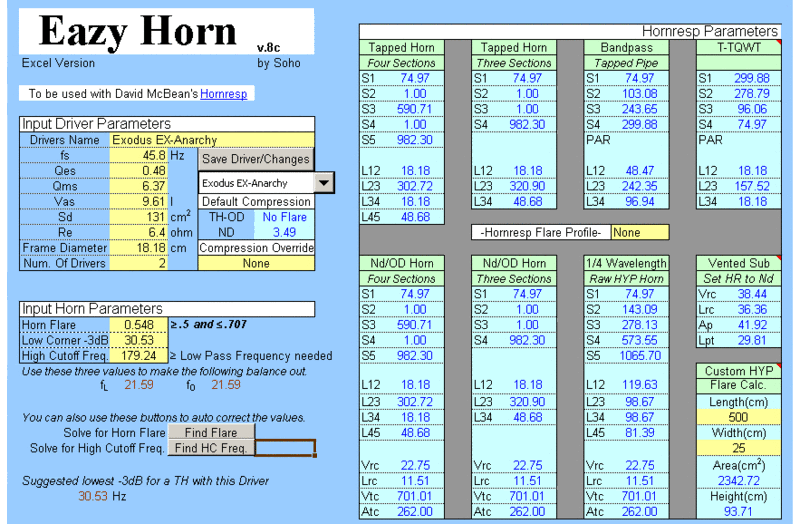
Working in -up to Office 2003 (at least,) and Open Office so far confirmed.
Newest/Last version posted here in post 44 & 45.
-
Here is an Excel spreadsheet that will help you design a few different things in Hornresp. (It is attached at the bottom.) It will model a single/multiple driver horn in TH, Nd, and OD configurations, in 3 or 4 sections. It will also do a BP type of quarter-wave resonator, and T-TQWT in a pinch.
Before I forget, let's thank Marshal Leach, Richard Long, and Tom Danley. They did all the real work. 😀
The majority of the math I used can be found here: New Link
Thanks go out to David McBean as well. Without his program there would be no need for this.
Working in -up to Office 2003 (at least,) and Open Office so far confirmed.
Newest/Last version posted here in post 44 & 45.
-
Attachments
Last edited:
I just finished an overhaul, and removed a lot of old cells, and code that were hold overs from other versions. The second page now includes a box to alter the Speed of Sound used, and a section that will allow you to enter your own length, and width into the horn profile generator.
I also fixed a condition that could give a negative last segment length, so it shouldn't happen anymore.
As always questions, comments, bug reports, and criticisms are welcome.
I also fixed a condition that could give a negative last segment length, so it shouldn't happen anymore.
As always questions, comments, bug reports, and criticisms are welcome.
Last edited:
Updated version.
Well I goofed.
Not being able to edit the posts is a pain. I uploaded the wrong version there. That one will not do multiple drivers. 🙄
Here is the one that will, or if you have the first already just undo protection on the second sheet with "soho" and copy/paste this into B15 "=Front!B10"
Sorry about that.
Well I goofed.
Not being able to edit the posts is a pain. I uploaded the wrong version there. That one will not do multiple drivers. 🙄
Here is the one that will, or if you have the first already just undo protection on the second sheet with "soho" and copy/paste this into B15 "=Front!B10"
Sorry about that.
Attachments

I figured I would get this out of the other thread.
Here is an Excel spreadsheet that will help you design a few different things in Hornresp. (It is attached at the bottom.) It will model a single/multiple driver horn in TH, Nd, and OD configurations, in 3 or 4 sections. It will also do a BP type of quarter-wave resonator, and T-TQWT in a pinch.
Before I forget, let's thank Marshal Leach, Richard Long, and Tom Danley. They did all the real work. 😀
The majority of the math I used can be found here: http://users.ece.gatech.edu/~mleach/.../HornPaper.pdf
Thanks go out to David McBean as well. Without his program there would be no need for this.
Working in -up to Office 2003 (at least,) and Open Office so far confirmed.
Neat stuff.
Suggestion: Use a separate sheet to host data that can be cut'n'pasted into a text file that can then be imported into HornResp. Makes transfer of information from the sheet to HornResp much simpler.
This spreadsheet is awesome. I tried to work my way through that Leach paper a year or two ago and couldn't quite get it. I've seen other spreadsheets/programs that automate Leach's math from that paper but none as useful as this one.
I can clearly see how you used Leach's work here, but not sure what parts you attribute to Long and Danley, could you elaborate?
I can clearly see how you used Leach's work here, but not sure what parts you attribute to Long and Danley, could you elaborate?
Brian Steele,
Thanks, I'll look into it.
just a guy,
Danley is there for the TH parts. They were developed using his patent app, various posts on different forums, and my reworking of his commercial offerings. Looking at the sheet there doesn't seem to be a lot there, but his subs were the driving force behind the whole thing.
The BP TP design I came up with after playing around with some of GMs recent designs. I found a quick way to get decent results, and added it in. There is a "better" way using a lot more math, but it ends up almost the same as the output now.
The T-TQWR design was just something I figured out using the data the sheet already provided that was easy, and worked. I thought bjorno would get a kick out of it seeing it there. 😀
The Nd/OD section was added just because it was so easy to add in. By using the TH horn positional data it isn't setup for the best Hyperbolic to whatever translation though. It is setup for an easy fold translation from HR. If you want to get crazy with your Nd/OD horn you need to do it manually.
F17 on the second sheet in the horns length. Take it *707 to get S3 from the S1. *707 again, and that is S2. Now go (length-(length*707))*707, that is S4 from S3. What's left over goes to L45. Now use the Custom Hyperbolic Horn inputs on page two to input those lengths from the throat to get a better HYP approximation.
Thanks, I'll look into it.
just a guy,
Long helped develop the working Reactance Annulling equations. The stuff in Leaches original work needed some help. In the link above it includes a "letters to the editor" section where Leach acknowledges his help.I can clearly see how you used Leach's work here, but not sure what parts you attribute to Long and Danley, could you elaborate?
Danley is there for the TH parts. They were developed using his patent app, various posts on different forums, and my reworking of his commercial offerings. Looking at the sheet there doesn't seem to be a lot there, but his subs were the driving force behind the whole thing.
The BP TP design I came up with after playing around with some of GMs recent designs. I found a quick way to get decent results, and added it in. There is a "better" way using a lot more math, but it ends up almost the same as the output now.
The T-TQWR design was just something I figured out using the data the sheet already provided that was easy, and worked. I thought bjorno would get a kick out of it seeing it there. 😀
The Nd/OD section was added just because it was so easy to add in. By using the TH horn positional data it isn't setup for the best Hyperbolic to whatever translation though. It is setup for an easy fold translation from HR. If you want to get crazy with your Nd/OD horn you need to do it manually.
F17 on the second sheet in the horns length. Take it *707 to get S3 from the S1. *707 again, and that is S2. Now go (length-(length*707))*707, that is S4 from S3. What's left over goes to L45. Now use the Custom Hyperbolic Horn inputs on page two to input those lengths from the throat to get a better HYP approximation.
Last edited:
I also fixed a condition that could give a negative last segment length, so it shouldn't happen anymore. As always questions, comments, bug reports, and criticisms are welcome.
Hi soho54,
1. Thanks for fixing the negative last segment length problem.
2. Have you considered automating the "-Make Equal-" requirement by deriving the High Corner frequency from the values of m and the Low Corner frequency?
This could be done relatively easily by entering the expression =A20-C20 in the 'Front'!E35 cell and changing the Sub TEST macro VBA procedure to the following:
Sub TEST()
Range("E35").GoalSeek Goal:=0, ChangingCell:=Range("B19")
Range("E42").GoalSeek Goal:=0, ChangingCell:=Range("E41")
End Sub
Would there be any downside to doing this?
3. Changing the value of Qes from 0.48 to 0.1 in the Version 5 default spreadsheet generates a macro VBA run-time error.
Kind regards,
David
Last edited:
I hadn't thought about it, but it could work. I think it might work better as a button though, just to leave a little fine tuning in there if needed. I'll check it out, thanks.2. Have you considered automating the "-Make Equal-" requirement by deriving the High Corner frequency from the values of m and the Low Corner frequency?
---
Would there be any downside to doing this?
I wasn't able to duplicate this problem. Mine went on as usual, and output a horn. Can I ask what program you are opening it up in?3. Changing the value of Qes from 0.48 to 0.1 in the Version 5 default spreadsheet generates a macro VBA run-time error.
Thanks for the input.
OK I added the button, It was interesting. I had to add some extra lines, but it works out pretty nicely.
Sub Button1_Click()
Range("G41").GoalSeek Goal:=301, ChangingCell:=Range("B19")
Range("G40").GoalSeek Goal:=0, ChangingCell:=Range("B19")
Range("e42").GoalSeek Goal:=0, ChangingCell:=Range("e41")
End Sub
G40=A20-C20 G41=1+B19
You raise HC temporarily, then set it correctly, and finally you have to run the length script again, as the original only work with manual changes to the sheet cells.
The trick is going from a design with a really low HC to one that needs a much higher one. Like say if I went from the default settings, and changed Qes to 1, optimized it, and then changed Qes back to .48. This will lead to a fault every time, as the original VB script to set the horn length can't hit zero.
If I can figure out an easy solution to this, the script errors should go away. The easy fix is to always bump HC up before changing drivers.
Sub Button1_Click()
Range("G41").GoalSeek Goal:=301, ChangingCell:=Range("B19")
Range("G40").GoalSeek Goal:=0, ChangingCell:=Range("B19")
Range("e42").GoalSeek Goal:=0, ChangingCell:=Range("e41")
End Sub
G40=A20-C20 G41=1+B19
You raise HC temporarily, then set it correctly, and finally you have to run the length script again, as the original only work with manual changes to the sheet cells.
The trick is going from a design with a really low HC to one that needs a much higher one. Like say if I went from the default settings, and changed Qes to 1, optimized it, and then changed Qes back to .48. This will lead to a fault every time, as the original VB script to set the horn length can't hit zero.
If I can figure out an easy solution to this, the script errors should go away. The easy fix is to always bump HC up before changing drivers.
Update v5a is out.
There are Excel, and OpenOffice versions. The OO need Excel macro compatibility turned on until I get full StarBasic scripts going.
This version also adds a push button HC to Fo matching, if you dislike doing it manually. (It auto sets the two orange cells for you )
I also changed the Qmc from =10, to Qmc=(SQRT(F10+1)*B10)+2. It's a minor change, but though I should note it as it will change the output numbers by a small amount.
There are Excel, and OpenOffice versions. The OO need Excel macro compatibility turned on until I get full StarBasic scripts going.
This version also adds a push button HC to Fo matching, if you dislike doing it manually. (It auto sets the two orange cells for you )
I also changed the Qmc from =10, to Qmc=(SQRT(F10+1)*B10)+2. It's a minor change, but though I should note it as it will change the output numbers by a small amount.
Attachments
Last edited:
Can I ask what program you are opening it up in?
Hi soho54,
I'm not sure if you still require an answer to the above question, but I am using Excel 2003 to open your worksheet. The macro error message generated when Qes is entered as 0.1 is shown in the attached screenprint.
Kind regards,
David
Attachments
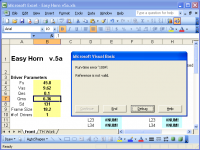
I can't duplicate the error by starting from default, and changing Qes to 1.Hi soho54,
I'm not sure if you still require an answer to the above question, but I am using Excel 2003 to open your worksheet. The macro error message generated when Qes is entered as 0.1 is shown in the attached screenprint.
If you hit "end" does it work after changing anything else?
Clicking "debug" should send you to the single line "Test" sub, yes?
Does the Auto Equalize work correctly for you?

Yeah, v5a starts going wacko as Qes drops out of range of the chosen Fh3, so I guess 'auto equalize' should do both the low and high corner.
GM
GM
If you set a driver/horn up, and it has a low HC, when you change the driver parameters to one that needs a much higher HC, the script will not be able to hit zero, as the Fc is now too low, and St is calculating as a negative number. This buggers everything, but hitting "End" and choosing a higher HC will get things get going again.
I came up with this code this morning to change the Sheet1 macro:
Sub TEST()
On Error GoTo errorchk
Range("e42").GoalSeek Goal:=0, ChangingCell:=Range("e41")
GoTo fin
errorchk: MsgBox "Error: High Corner must be raised!"
fin:
End Sub
Instead of the Run-time Error, you will get a box popping up that will tell you to raise the HC, and you just click OK.
I'm trying to get some code to work that would sense the error, and then raise the HC on it's own to compensate without any input from the user.
I came up with this code this morning to change the Sheet1 macro:
Sub TEST()
On Error GoTo errorchk
Range("e42").GoalSeek Goal:=0, ChangingCell:=Range("e41")
GoTo fin
errorchk: MsgBox "Error: High Corner must be raised!"
fin:
End Sub
Instead of the Run-time Error, you will get a box popping up that will tell you to raise the HC, and you just click OK.
I'm trying to get some code to work that would sense the error, and then raise the HC on it's own to compensate without any input from the user.
OK, I have two replacements for the Sheet1 script here. Instead of the Message Box from the last post, the first one automatically sets the HC up to 200 which should work for most bass horns.
Sub TEST()
On Error GoTo errorchk
Range("e42").GoalSeek Goal:=0, ChangingCell:=Range("e41")
GoTo fin
errorchk: Worksheets("Front").Cells(19, 2).Value = 200
Range("e42").GoalSeek Goal:=0, ChangingCell:=Range("e41")
fin:
End Sub
or how about setting it to the Mass Roll-off?
Sub TEST()
On Error GoTo errorchk
Range("e42").GoalSeek Goal:=0, ChangingCell:=Range("e41")
GoTo fin
errorchk: Range("B19").Formula = "=(2*B4)/B6"
Range("e42").GoalSeek Goal:=0, ChangingCell:=Range("e41")
fin:
End Sub
I'm leaning towards the later myself. What do you guys think? The Message Box from the last post, the auto 200, or a quick 2Fs/Qes equation?
Sub TEST()
On Error GoTo errorchk
Range("e42").GoalSeek Goal:=0, ChangingCell:=Range("e41")
GoTo fin
errorchk: Worksheets("Front").Cells(19, 2).Value = 200
Range("e42").GoalSeek Goal:=0, ChangingCell:=Range("e41")
fin:
End Sub
or how about setting it to the Mass Roll-off?
Sub TEST()
On Error GoTo errorchk
Range("e42").GoalSeek Goal:=0, ChangingCell:=Range("e41")
GoTo fin
errorchk: Range("B19").Formula = "=(2*B4)/B6"
Range("e42").GoalSeek Goal:=0, ChangingCell:=Range("e41")
fin:
End Sub
I'm leaning towards the later myself. What do you guys think? The Message Box from the last post, the auto 200, or a quick 2Fs/Qes equation?
Last edited:
Hmm, the first one pops up the run time error window, but installs the default '200' after closing it. Clicking the AE 'button' changes it to 0.00 and pops up the error window again. Manally changing it to some value that might fall within the range of the AE, it auto returns to the '200'/error window, so basically locked out. Changing the LC to a lower number does the same thing. Since it can't be equalized, it displays #NUM! in all the pertinent alignment fields, so a tweak I can't use.
Going back to the original command script, I can keep adjusting the HC to get a match, but hitting AE just nets me a 0.00/error message even if already matched.
I use Excel 2K/SP3 BTW.
Since you've reverse engineered me, you know which I prefer most of the time until enough real world evidence convinces me otherwise and how I manipulate changing it when I feel the need. 😉.
GM
Going back to the original command script, I can keep adjusting the HC to get a match, but hitting AE just nets me a 0.00/error message even if already matched.
I use Excel 2K/SP3 BTW.
Since you've reverse engineered me, you know which I prefer most of the time until enough real world evidence convinces me otherwise and how I manipulate changing it when I feel the need. 😉.
GM
And this is why I hate VB. 🙄 They worked fine on my 2K copy. The later one would not allow an AE after it was used unless you manually changed HC as it was posted here though, but the "200" one worked fine.
Maybe I should just take that part out entirely, and use straight 1/4 distances.
I just did another take on another idea, and I have a good feeling this time. If the HC is too low it should Auto Equalize on it's own. This will allow you to tweak by hand it you want, and get rid of those pesky errors. It does for me anyway.
I also added an "Ideal" 1/4 horn profile mainly for the Nd/OD horns. Which I talked about above somewhere. You can use it with a TH by entering in the S & Ls, then using the wizard to move L12, and L45 back to the TH positions with S2 Variable on.
Maybe I should just take that part out entirely, and use straight 1/4 distances.
I just did another take on another idea, and I have a good feeling this time. If the HC is too low it should Auto Equalize on it's own. This will allow you to tweak by hand it you want, and get rid of those pesky errors. It does for me anyway.
I also added an "Ideal" 1/4 horn profile mainly for the Nd/OD horns. Which I talked about above somewhere. You can use it with a TH by entering in the S & Ls, then using the wizard to move L12, and L45 back to the TH positions with S2 Variable on.
Attachments
I don't have the patience to program, so just hate how some work.
Anyway, it seems to work per your description until I get down to 0.14 Qes where it acts like the previous version, i.e. nothing I change other than raising Qes stops the 0.00/1004 error when using the AE, though if I input a high enough HC it will calculate alignments.
Browsing TH Work, it appears that J5 is what's causing the problem since at some HC point the driver's radius is too large to fit on the end of the horn, so is there a way to have the program alert this without all the head scratching frustration?
GM
Anyway, it seems to work per your description until I get down to 0.14 Qes where it acts like the previous version, i.e. nothing I change other than raising Qes stops the 0.00/1004 error when using the AE, though if I input a high enough HC it will calculate alignments.
Browsing TH Work, it appears that J5 is what's causing the problem since at some HC point the driver's radius is too large to fit on the end of the horn, so is there a way to have the program alert this without all the head scratching frustration?
GM
Hahaha... you are good at finding problems. Keep'em coming.
The problem here is that there is no way for a horn to be made from those parameters at all. It's the LC acting up here. It's where B22 is copied over to B19. From there it is used in Fc and Qtc, and they hit everything. 😱
If you set the LC to 44 everything will go through, only the AE will still not zero. You get -19.3, but it doesn't throw a flag. It will continue to act funny up until 47 or higher. I don't know why it isn't faulting out though?
Hc 635 is the magic number.
I'll fix it somehow.
The problem here is that there is no way for a horn to be made from those parameters at all. It's the LC acting up here. It's where B22 is copied over to B19. From there it is used in Fc and Qtc, and they hit everything. 😱
If you set the LC to 44 everything will go through, only the AE will still not zero. You get -19.3, but it doesn't throw a flag. It will continue to act funny up until 47 or higher. I don't know why it isn't faulting out though?
Hc 635 is the magic number.
I'll fix it somehow.
Last edited:
- Home
- Loudspeakers
- Subwoofers
- Easy Horn Excel Spreadsheet