
hi there, i stumbled across this site while looking for info on my 3020. instead of hijacking the other thread, i thought i would start my own.
i have an nad 3020a, or it might be a b, how do i tell? the model number on the back just says 3020, but the internal layout is significantly different than the 3020.
anyways, i bought it for $10 at a pawn shop a few years ago but kinda forgot about it, now i want to get it working. when i turn it on, all 4 fuses stay put of but all i get from the speakers is a steady, repetitive and loud pop and the volume power leds light up from 1 to 35 repeatedly.
i am somewhat of a novice with electronic repair. i took a course in high school, so i know the basics(identifying parts and what they do) and am not afraid to break out a soldering iron. i am ok at reading a schematic, though i am no expert.
i am also going in this blind since i cannot find a schematic or service manual for the 3020a. i did some quick tests on the output transistors, along with a few others with a multimeter.....i found 2 2SD669a transistors that appear to be shorted(the reading on the meter was only 130).......but again, i am no expert.
i have been looking around on digi-key, and seeing as how i can replace all the caps, the 4 output transistors and a few other things for only $30 i figured it would be a good idea.
this is about as far as my knowledge takes me, and i really don't have much of an idea on pinpointing the actual problem. so i have a few questions.
any ideas where the problem might lie, or tests i can do to help pinpoint the problem?
http://www.datasheetcatalog.org/datasheet/HitachiSemiconductor/mXwuvwq.pdf is the datasheet for the d669 transistor, would this one: Digi-Key - 497-7573-5-ND (Manufacturer - STT13005) be a suitable replacement?
while i am replacing the caps, is there any upgrades i should consider? i read in a few places that some people replace the 4 2200uf caps with 3300uf, should i bother?
does anyone have a link to a schematic or service manual for the 3020a?
anything else i should look at replacing while i have an order with digi-key going?
thanks in advance for any help. attached is what the internals of mine look like:
i have an nad 3020a, or it might be a b, how do i tell? the model number on the back just says 3020, but the internal layout is significantly different than the 3020.
anyways, i bought it for $10 at a pawn shop a few years ago but kinda forgot about it, now i want to get it working. when i turn it on, all 4 fuses stay put of but all i get from the speakers is a steady, repetitive and loud pop and the volume power leds light up from 1 to 35 repeatedly.
i am somewhat of a novice with electronic repair. i took a course in high school, so i know the basics(identifying parts and what they do) and am not afraid to break out a soldering iron. i am ok at reading a schematic, though i am no expert.
i am also going in this blind since i cannot find a schematic or service manual for the 3020a. i did some quick tests on the output transistors, along with a few others with a multimeter.....i found 2 2SD669a transistors that appear to be shorted(the reading on the meter was only 130).......but again, i am no expert.
i have been looking around on digi-key, and seeing as how i can replace all the caps, the 4 output transistors and a few other things for only $30 i figured it would be a good idea.
this is about as far as my knowledge takes me, and i really don't have much of an idea on pinpointing the actual problem. so i have a few questions.
any ideas where the problem might lie, or tests i can do to help pinpoint the problem?
http://www.datasheetcatalog.org/datasheet/HitachiSemiconductor/mXwuvwq.pdf is the datasheet for the d669 transistor, would this one: Digi-Key - 497-7573-5-ND (Manufacturer - STT13005) be a suitable replacement?
while i am replacing the caps, is there any upgrades i should consider? i read in a few places that some people replace the 4 2200uf caps with 3300uf, should i bother?
does anyone have a link to a schematic or service manual for the 3020a?
anything else i should look at replacing while i have an order with digi-key going?
thanks in advance for any help. attached is what the internals of mine look like:
Attachments


There are a number of versions.
Early service manual:
http://p10hifi.net/planet10/manuals/NAD_3020_ServiceManual.pdf
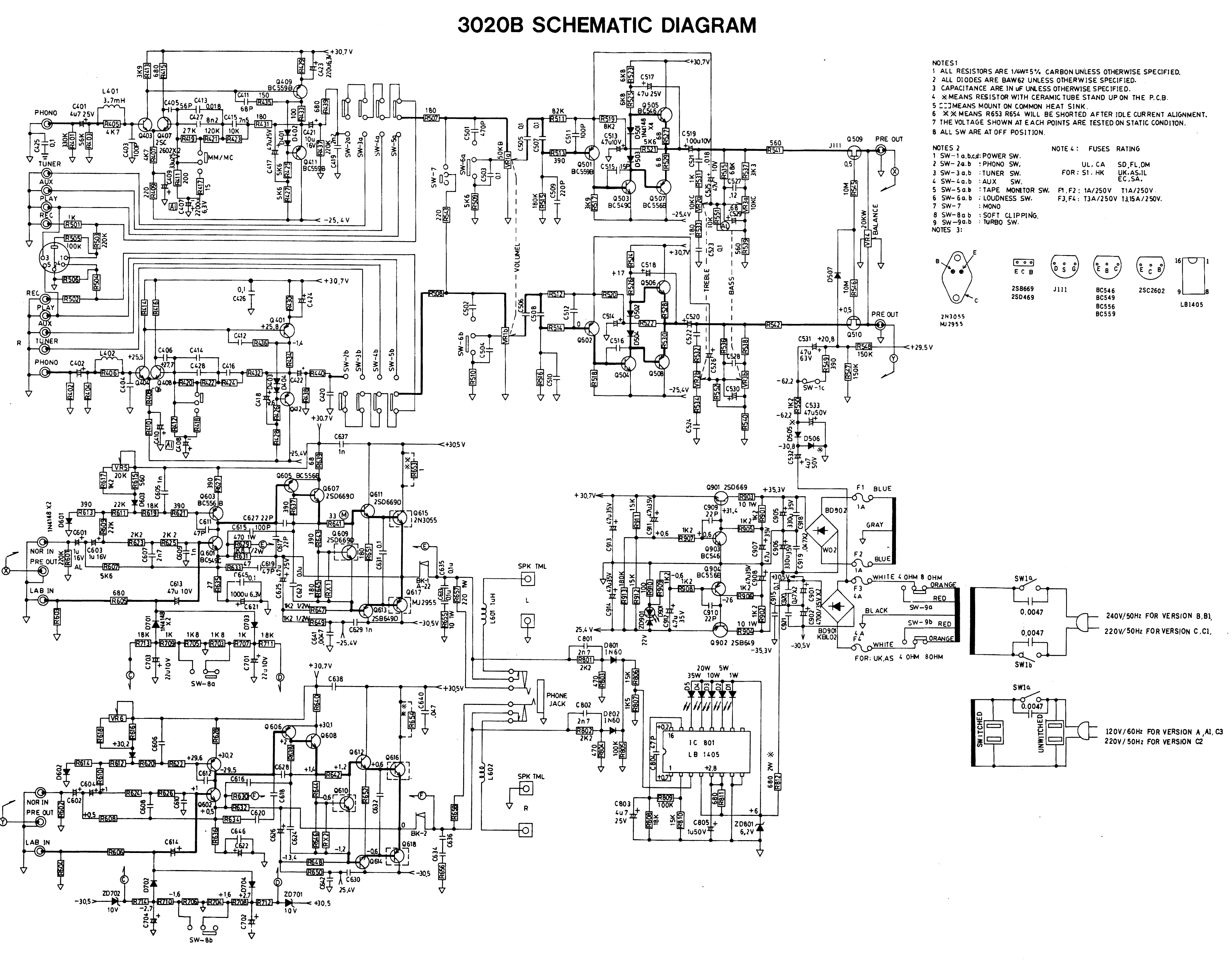
Map for the 3020B
dave
Early service manual:
http://p10hifi.net/planet10/manuals/NAD_3020_ServiceManual.pdf
Map for the 3020B
dave
thanks, is the 3020b the same as the 3020a? i know mine is a different layout that the one in the service manual you posted.
i went ahead and placed the order at digi-key. i got all the elec caps, the 4 main output transistors and a few other transistors.
any other help or insight regarding my questions would be greatly appreciated.
i went ahead and placed the order at digi-key. i got all the elec caps, the 4 main output transistors and a few other transistors.
any other help or insight regarding my questions would be greatly appreciated.
Each suffix is at least somewhat different. I sold a ton of the early ones. I'm not the one to ask about any actual electronics detail... i just scanned the manual.
dave
dave

You need to check semiconductors out of circuit... that "130" may be a reading affected by low vaue resistors around the device.
Personally I would try an confirm where the fault lies first if possible. Alo always power up with a 100 watt filament bulb in series with the mains to limit any excess current flow while the amp is faulty. Far better to see the bulb light than to blow the outputs 🙂
Personally I would try an confirm where the fault lies first if possible. Alo always power up with a 100 watt filament bulb in series with the mains to limit any excess current flow while the amp is faulty. Far better to see the bulb light than to blow the outputs 🙂
thanks for the reply. i really would like to find the problem first, but i really don't know/remember enough about how this stuff works. i don't really know where to start.
i do plan on testing some more, and i realize that my reading would/could be affected by something else in the circuit. i got my package from digikey(next day, very fast delivery) so i think i'll start poking away at it this weekend. thanks for the light bulb tip, will definitely do that.
i am more or less doing this to see if i can bring it back to life, if not i might have someone more qualified look at it. ultimately i would like to learn more about his, i am not afraid to learn and have always enjoyed tinkering with things......
i do plan on testing some more, and i realize that my reading would/could be affected by something else in the circuit. i got my package from digikey(next day, very fast delivery) so i think i'll start poking away at it this weekend. thanks for the light bulb tip, will definitely do that.
i am more or less doing this to see if i can bring it back to life, if not i might have someone more qualified look at it. ultimately i would like to learn more about his, i am not afraid to learn and have always enjoyed tinkering with things......
well, just an update here. upon removing the bottom cross bracket and looking underneath it i found my problem, cracked pcb. i found all the cut traces and jumped them with wire, it turned on and worked. i decided to replace all the caps anyways(since i had them), found a few that didn't look too healthy. i didnt bother replacing the output transistors(if they work then there would be no point, right?).
tomorrow i will hook it up to some quality speakers and a quality source and see how it sounds. one thing i did notice is that the amp part does not kick in until a few seconds after i turn it on. i can hear the sound, but it is not amplified right away. i don't know if this is normal or not for this amp....
tomorrow i will hook it up to some quality speakers and a quality source and see how it sounds. one thing i did notice is that the amp part does not kick in until a few seconds after i turn it on. i can hear the sound, but it is not amplified right away. i don't know if this is normal or not for this amp....

The muting behavior is normal and is caused by a power-on mute circuit on the preamp outputs. On the schematic posted above this is done by Q509/Q510 and associated parts.
Subscribed but still no notification... interesting, see post #243
http://www.diyaudio.com/forums/troubleshooting/148984-bugs-13.html
Pleased you have fixed it anyway 🙂
http://www.diyaudio.com/forums/troubleshooting/148984-bugs-13.html
Pleased you have fixed it anyway 🙂
- Status
- Not open for further replies.
- Home
- Amplifiers
- Solid State
- a little advice on repairing an NAD 3020a