


Great Job Schmeet.
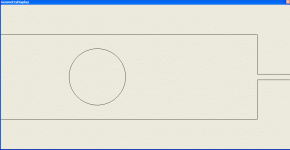
I was wondering how easy it would be to have the option of choosing between a round or square enclosure?
And as mentioned earlier, to be able to select between different input measurements (eg... cm2 / m2 etc)
Keep up the good work and don't get too distracted by Android world, we need you in PC world.
Regards
Dean
I was wondering how easy it would be to have the option of choosing between a round or square enclosure?
And as mentioned earlier, to be able to select between different input measurements (eg... cm2 / m2 etc)
Keep up the good work and don't get too distracted by Android world, we need you in PC world.
Regards
Dean

Great Job Schmeet.
I was wondering how easy it would be to have the option of choosing between a round or square enclosure?
And as mentioned earlier, to be able to select between different input measurements (eg... cm2 / m2 etc)
Keep up the good work and don't get too distracted by Android world, we need you in PC world.
Regards
Dean
Unit conversions is on my list of things to do, but tbh it will be on the bottom of the list for a while!
Regarding enclosure shape. i have plans to make the geometry viewer and bit more fully featured and enclosure shape will have some impact here. But as far as response calculations go. I do not calculate modes cross-modes and so the enclosure shape (in cross section) doesn't make any difference. Only its area...
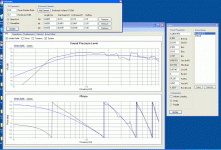
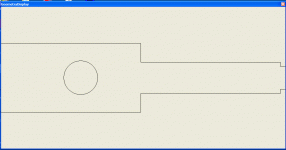
Thanks for the heads up on the splash screen I'll fix that...
Hi Pete,
Your transmission line software refers to Leonard Acoustics whereas your 'under construction' website is titled Leonard Audio.
Not sure if it is intentional on your part, but Leonard Audio is bound to be confused with Lenard Audio
 .
.Lenard Audio
Kind regards,
David
...if such a thing can ever exist with just one developer!?
Hi Pete,
I know exactly what you mean...
.Kind regards,
David

Hi Schmeet,
First off all, kudos for developing this piece of SW. I was waiting for someone to develop this for a while now. It works brilliantly!
2 remarks;
1. It would be nice to be able to enter the T/S parameters in the same way as winISD, especially the automatic conversion is very very convenient.
2. An option that lets you enter 2 drivers in 1 TL would be nice to have.
First off all, kudos for developing this piece of SW. I was waiting for someone to develop this for a while now. It works brilliantly!
2 remarks;
1. It would be nice to be able to enter the T/S parameters in the same way as winISD, especially the automatic conversion is very very convenient.
2. An option that lets you enter 2 drivers in 1 TL would be nice to have.
Hi Bjorn,
Yes I already did this when I was playing around with the program. The "problem" with this is that the response is only being simulated from a single point in the TL not from 2 points (or an x number of points). This has an effect on the response!
Just my 2(euro)C.
Yes I already did this when I was playing around with the program. The "problem" with this is that the response is only being simulated from a single point in the TL not from 2 points (or an x number of points). This has an effect on the response!
Just my 2(euro)C.
Hi guys,
Well that update that i was talking about (^above) is pretty much done and you can now install it via the about menu.
I have tested it to a certain extent but please be do report any bugs you find as I'm sure there will be a couple.
So, the updates:
I have completely changed the way i handle and calculate the geometry. This has enabled me to make it so you can input any number of elements and every element can branch each branch can then have any number of elements which also can branch etc. etc.
The end element of each branch can be set to be either an open end or a closed end. This should enable people to get very creative with their geometries as there are endless formats available.
I have had a quick play around and by adding a couple of closed end side branches you can filter out some of the upper harmonics etc.
you could, in theory, model things like the acoustic impedance of woodwind instruments by modelling each finger hole as an open ended side branch....
The downside to this update is that it is now slightly harder to enter the geometry for a simple TL with an offset driver. The driver is always at the start, so you have to make the first element the open end of the TL and then branch it and make the other element the closed end of the TL and the driver will be at the start of the 'branch'. The results are identical.
I will endeavor to make some kind of wizard so that it is easier to enter common geometries.
But for now, let me know what you think...
Also, is it possible to do this in any of the other modelling programs? i would like a comparison as I am pretty sure I have the maths right, but a check would be good...
Well that update that i was talking about (^above) is pretty much done and you can now install it via the about menu.
I have tested it to a certain extent but please be do report any bugs you find as I'm sure there will be a couple.
So, the updates:
I have completely changed the way i handle and calculate the geometry. This has enabled me to make it so you can input any number of elements and every element can branch each branch can then have any number of elements which also can branch etc. etc.
The end element of each branch can be set to be either an open end or a closed end. This should enable people to get very creative with their geometries as there are endless formats available.
I have had a quick play around and by adding a couple of closed end side branches you can filter out some of the upper harmonics etc.
you could, in theory, model things like the acoustic impedance of woodwind instruments by modelling each finger hole as an open ended side branch....
The downside to this update is that it is now slightly harder to enter the geometry for a simple TL with an offset driver. The driver is always at the start, so you have to make the first element the open end of the TL and then branch it and make the other element the closed end of the TL and the driver will be at the start of the 'branch'. The results are identical.
I will endeavor to make some kind of wizard so that it is easier to enter common geometries.
But for now, let me know what you think...
Also, is it possible to do this in any of the other modelling programs? i would like a comparison as I am pretty sure I have the maths right, but a check would be good...
- Home
- Design & Build
- Software Tools
- Transmission Line Modelling Software