
Wasn't sure where to post this spreadsheet tool for calculating golden ratio and volume.
View attachment golden ratio.zip
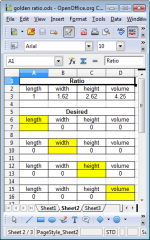
Enter value in yellow field and it calculates white fields.
View attachment golden ratio.zip
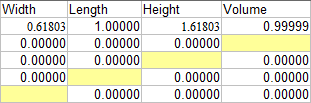
Enter value in yellow field and it calculates white fields.


Last edited:
The image looks good. The Zip didn't keep the package togther thou (so is a useless mess). You should save out as a pre-xml Excel file so that it is more compatiable
Excel sucks as a spreadsheet (a good example of how world dominance stifles innovation). It should be possible to put it on 1 visible line (but would likely require some temporary cells elsewhere)
dave
Excel sucks as a spreadsheet (a good example of how world dominance stifles innovation). It should be possible to put it on 1 visible line (but would likely require some temporary cells elsewhere)
dave
Might be because I'm using Open Office. Tried saving it as xls 'Excel 2003' this time.
View attachment golden ratio.zip
Edit. OK, maybe 7zip is at fault here. Corrupting its archives
I checked the earlier files I uploaded, they are not corrupt. Its a problem with the open office calc / m$ office excel format conversion.
View attachment golden ratio.zip
Edit. OK, maybe 7zip is at fault here. Corrupting its archives
I checked the earlier files I uploaded, they are not corrupt. Its a problem with the open office calc / m$ office excel format conversion.
Last edited:
Gee, thanks Mister! 
Formulas I used are a little different.. Columns B-E, Rows 3-6
B3 [=E3^(1/3)/D2], C3 [=E3^(1/3)], D3 [=E3^(1/3)*D2], E3 [Blank-Enter Volume]
B4 [=D4/D2/D2], C4 [=D4/D2], D4 [Blank-Enter Height], E4 [=B4*C4*D4]
B5 [=C5/D2], C5 [Blank-Enter Length], D5 [=C5*D2], E5 [=B5*C5*D5]
B6 [Blank-Enter Width], C6 [=B6*D2], D6 [=C6*D2], E6 [=B6*C6*D6]
Formulas I used are a little different.. Columns B-E, Rows 3-6
B3 [=E3^(1/3)/D2], C3 [=E3^(1/3)], D3 [=E3^(1/3)*D2], E3 [Blank-Enter Volume]
B4 [=D4/D2/D2], C4 [=D4/D2], D4 [Blank-Enter Height], E4 [=B4*C4*D4]
B5 [=C5/D2], C5 [Blank-Enter Length], D5 [=C5*D2], E5 [=B5*C5*D5]
B6 [Blank-Enter Width], C6 [=B6*D2], D6 [=C6*D2], E6 [=B6*C6*D6]
Last edited:
- Status
- This old topic is closed. If you want to reopen this topic, contact a moderator using the "Report Post" button.
- Home
- Design & Build
- Software Tools
- Golden Ratio <=> Volume Calculator