
Guys
I was looking at purchasing an Asus Xonar Essence SX. Initially I'd be using the onboard DAC whilst I finish building my own DAC but then I thought: if I'm to eventually end up just using the digital out on this card, is it overkill?
Money is not much of a problem so I'm not trying to save any money but I'm just thinking, is there a better option? I've taken a look at the ESI Juli@ which looks ok. What else is really good, has the ability to play decent sound alone but will be awesome connected to my WM8471 based DAC?
Sorry for the "which is better" style post but who's used what, and what's decent?
Cheers
Chris
I was looking at purchasing an Asus Xonar Essence SX. Initially I'd be using the onboard DAC whilst I finish building my own DAC but then I thought: if I'm to eventually end up just using the digital out on this card, is it overkill?
Money is not much of a problem so I'm not trying to save any money but I'm just thinking, is there a better option? I've taken a look at the ESI Juli@ which looks ok. What else is really good, has the ability to play decent sound alone but will be awesome connected to my WM8471 based DAC?
Sorry for the "which is better" style post but who's used what, and what's decent?
Cheers
Chris
Asus v Juli@
Hey Chris,
Did you mean 8741 ??
Anyway, I have an Asus Zonar D2/PM and a Juli@ and I prefer the Juli@ using the SPDIF output into a modded DCX2496. Using the Juli@ you could also directly connect the I2S of the Juli@ to your DAC to bypass the SPDIF conversion. The only downside to the Juli@ for me has been that is it doesn't have a headphone out.
Cheers,
Paul.
Hey Chris,
Did you mean 8741 ??
Anyway, I have an Asus Zonar D2/PM and a Juli@ and I prefer the Juli@ using the SPDIF output into a modded DCX2496. Using the Juli@ you could also directly connect the I2S of the Juli@ to your DAC to bypass the SPDIF conversion. The only downside to the Juli@ for me has been that is it doesn't have a headphone out.
Cheers,
Paul.

Using the Juli@ you could also directly connect the I2S of the Juli@ to your DAC to bypass the SPDIF conversion.
This is precisely what I've done with my Essence ST (I assume this is the one the Chris is talking about. There's the ST and the STX, but not the SX. The ST has the reclocking low jitter chip and the expansion header, the STX does not.)
Tapping I2S from the ST is very easy, three of the pins on the expansion header carry the master, bit and LR clock. You only need to solder one wire directly to the board (for the data stream) and that can be done on the reverse side.
Previously I had an Maudio revolution 7.1, this uses the same Envy chip from VIA as the Julia@. In my setup the ST sounds significantly better then the revolution did. Whether or not this is down to the CMedia CMI8788 PCI interface chip that the Asus uses, or the fact that the ST uses some low jitter reclocking IC before the CMI8788, I don't know.
The Xonar card has better measured performance, something that is less important to some people, but the advantage of this is that the Xonar ST makes for a very useful tool for measuring the performance of the equipment you build.
I would definitely recommend that you consider placing the DAC chip/IV/line driver in the PC case close to the sound card and tap the I2S lines. Of course use a separate transformer externally, with the regulators close to the DAC chip.
You will probably be surprised at how good this will sound, I'm using a dual mono balanced output implementation with two PCM1794s. As these are hard wire controlled, it makes using them very easy.
The advantage of using a balanced output is that you can lift the ground connection between the PC and whatever it is you are going to drive.
I also assume that you are referring to the WM8741 DAC chip made by Wolfson, the WM8471 doesn't seem to exist.😀 This chip looks like it would work well too, offering hard wire control and working with the full range of sampling frequencies, without requiring any circuit changes.
I also recommend you use the THS4031/32 for I/V conversion. If you do you will need to place a resistor in series with the feedback capacitor to decouple the output from the capacitive load, 22R will be fine. If you don't do this the 4031 isn't happy and as a result runs a lot hotter and has significantly higher distortion. We're talking -70dB, which seriously compromises the system linearity.
If you want more information with regards to doing this don't hesitate to ask.
Thanks for the replies.
5th Element,
Thanks for this - looks like we're on the same wavelength. As I wrote the original post at work I was taking care that my boss didn't see me and wrote it complete wrong. Yes, I meant the ST and the WM8741 🙂
I'm going to order the ST next week (after driving round Manchester to see if I can pick it up anywhere there and then) and have a play around. Might have to give you a shout when it comes to locating the I2S if that's ok?
I'm using the WM8741 evaluation board that I finally managed to get fired up last night. Not tested it yet with anything but I'm looking forward to seeing how it sounds
Cheers
Chris
5th Element,
Thanks for this - looks like we're on the same wavelength. As I wrote the original post at work I was taking care that my boss didn't see me and wrote it complete wrong. Yes, I meant the ST and the WM8741 🙂
I'm going to order the ST next week (after driving round Manchester to see if I can pick it up anywhere there and then) and have a play around. Might have to give you a shout when it comes to locating the I2S if that's ok?
I'm using the WM8741 evaluation board that I finally managed to get fired up last night. Not tested it yet with anything but I'm looking forward to seeing how it sounds
Cheers
Chris
Might have to give you a shout when it comes to locating the I2S if that's ok?
Sure, no problem.🙂
The Envy-based cards (Maya, Juli, Prodigy, etc.) feature two crystals for 44.1kHz and 48kHz families and generate their clock by simple frequency division, unlike the Essence cards which utilize PLL from a single crystal. The "jitter reduction chip" is just a precision PLL synthesis chip, producing the appropriate clock for the required fs.
I personally would go for pure frequency division and two crystals. Another question is PCI vs. PCIe, there are not many (any?) PCIe cards with two crystals.
I personally would go for pure frequency division and two crystals. Another question is PCI vs. PCIe, there are not many (any?) PCIe cards with two crystals.
The "jitter reduction chip" is just a precision PLL synthesis chip, producing the appropriate clock for the required fs.
I don't think the jitter reduction chip is told to create different frequencies based on the sampling frequency. I do of course know that it can do this, I was browsing the data sheet a few days ago. However the rest of the cards using the Cmedia chips don't feature anything other then a simple crystal at one fixed frequency.
I was under the impression that the jitter reduction chip simply resynthesised this single frequency as a low jitter clock and that was fed into the Cmedia chip.
The rest of the clock synthesis the Cmedia chip handles itself.
I could be wrong on this and in the not too distant future I am going to take the ST out of the computer again to figure out exactly what's going on.
As far as I know this is the chip used - http://www.cirrus.com/en/pubs/proDatasheet/CS2000-CP_F1.pdf.
If I can I will try and get the scope on the output to see what's going on.
Last edited:
5th element,
Fortunately we do not have to take a guess about functions of CS2000 in Essence ST since we have linux alsa drivers source code freely available.
A short analysis of git.alsa-project.org Git - alsa-kmirror.git/blob - pci/oxygen/xonar_pcm179x.c shows CS2000 registers are modified only when switching from userspace between PCM1792A oversampling of x64 and x128. Clearly that control is independent of the actual sample rate. You are right, CS2000 only provides stable single frequency clock for CMI8788 which employs its internal PLL for 44.1kHz Fs family, just as in the STX model.
Nevertheless, there is still PLL used for CD-audio formats in both models which in my eyes makes the cards less suitable for "hard core" audiophiles than the cards with two separate crystals.
Fortunately we do not have to take a guess about functions of CS2000 in Essence ST since we have linux alsa drivers source code freely available.
A short analysis of git.alsa-project.org Git - alsa-kmirror.git/blob - pci/oxygen/xonar_pcm179x.c shows CS2000 registers are modified only when switching from userspace between PCM1792A oversampling of x64 and x128. Clearly that control is independent of the actual sample rate. You are right, CS2000 only provides stable single frequency clock for CMI8788 which employs its internal PLL for 44.1kHz Fs family, just as in the STX model.
Nevertheless, there is still PLL used for CD-audio formats in both models which in my eyes makes the cards less suitable for "hard core" audiophiles than the cards with two separate crystals.
In checking the specs for the cmedia CM8788 stuff I see the following limitations:
1) 24.576 crystal only, needs PLL or DDS technology to make the 44.1 frequency chain. A single crystal is a selling point per cmedia.
2) The drivers don't support 176.4K sample rates at all.
Its not clear from the specs but I would not be surprised to find an internal sample rate converter.
The Via chipset uses two crystals so no PLL or similar, however they left out support for 176.4. The Juli@ uses an external clock chain to create the 176.4K sample rate. It does deliver "bit perfect" for all of the standard sample rates in every test I have tried.
I would have really liked for the cmedia stuff to meet these requirements however they don't see them as a real issue at any level.
The Juli@ still seems to be the most flexible and useable mid priced card (and the only route I know with a no pll solution, even the high end cards all have PLL's).
1) 24.576 crystal only, needs PLL or DDS technology to make the 44.1 frequency chain. A single crystal is a selling point per cmedia.
2) The drivers don't support 176.4K sample rates at all.
Its not clear from the specs but I would not be surprised to find an internal sample rate converter.
The Via chipset uses two crystals so no PLL or similar, however they left out support for 176.4. The Juli@ uses an external clock chain to create the 176.4K sample rate. It does deliver "bit perfect" for all of the standard sample rates in every test I have tried.
I would have really liked for the cmedia stuff to meet these requirements however they don't see them as a real issue at any level.
The Juli@ still seems to be the most flexible and useable mid priced card (and the only route I know with a no pll solution, even the high end cards all have PLL's).
Hi Guys
Sorry for hi-jacking my thread back 😀
Well I went for the Asus card in the end. I've gotten everything set up and to be completely honest I'm very impressed. I haven't connected it to my DAC yet and everything is crammed into my computer room. I'm going to move it into my home theatre over the weekend and get a media server set up (well its a hi-fi but the only way I can get my Mrs to agree is by calling it a theatre room)
Anyway - I'm using JRiver media centre 15 as it gets quite good reviews. I've ripped a few audio CD's using MC15 to flac files. I'm outputting using ASIO. There's a nifty setting that display's ASIO settings before the audio starts playing but it says 44.1Khz 2 channel. All the settings I've changed to 24bit 192KHz. Is this normal?
As for sounds - the first track I played was take 5. It sounded great. Bass is much more prominent and the sound stage is excellent. The treble seems a bit screechy but that's the way my scan-speak 2-ways are set up.
Any ideas how I set this up or should I give up and use foobar?
Cheers
Chris
Sorry for hi-jacking my thread back 😀
Well I went for the Asus card in the end. I've gotten everything set up and to be completely honest I'm very impressed. I haven't connected it to my DAC yet and everything is crammed into my computer room. I'm going to move it into my home theatre over the weekend and get a media server set up (well its a hi-fi but the only way I can get my Mrs to agree is by calling it a theatre room)
Anyway - I'm using JRiver media centre 15 as it gets quite good reviews. I've ripped a few audio CD's using MC15 to flac files. I'm outputting using ASIO. There's a nifty setting that display's ASIO settings before the audio starts playing but it says 44.1Khz 2 channel. All the settings I've changed to 24bit 192KHz. Is this normal?
As for sounds - the first track I played was take 5. It sounded great. Bass is much more prominent and the sound stage is excellent. The treble seems a bit screechy but that's the way my scan-speak 2-ways are set up.
Any ideas how I set this up or should I give up and use foobar?
Cheers
Chris
In checking the specs for the cmedia CM8788 stuff I see the following limitations:
2) The drivers don't support 176.4K sample rates at all.
Asus have released a beta driver for the ST that uses ASIO and allows bit perfect transfer of audio, this also includes the sample frequency of 176.4k.
Regardless of the system settings for the Xonar card, using an ASIO output bypasses all of these (such as sample frequency setting etc) and forces the card to work precisely at what data rate the output stream is set at.
Its not clear from the specs but I would not be surprised to find an internal sample rate converter.
There is, but it could either be done in software or hardware. However this only comes into play when something outputs a sampling frequency the card isn't set to.
It is easy to bypass the re-sampling however. You either use the ASIO output or make sure that every sample rate in software and hardware are all selected to the same thing.
This includes setting the card to the correct sample frequency via Asus' software. Then setting the correct sample frequency on the output via the 'Sound' section under control panel.
Setting the sampling frequency via the Asus software adjusts the hardware on the card causing it to physically change the clocks. However if you've got the cards hardware set to 96khz, but the Windows audio setup has the card listed as 48khz, windows will resample, so it's important to make sure Windows knows what's going on.
The Via chipset uses two crystals so no PLL or similar, however they left out support for 176.4. The Juli@ uses an external clock chain to create the 176.4K sample rate. It does deliver "bit perfect" for all of the standard sample rates in every test I have tried.
The Maudio card that I've got can function @ 176.4k and there certainly isn't anything special arranged for this. It simply has two crystals as specified by the VIA data sheet.
I would have really liked for the cmedia stuff to meet these requirements however they don't see them as a real issue at any level.
It seems that this is all driver related and Asus appear to be working on improving this for their cards.
The Juli@ still seems to be the most flexible and useable mid priced card (and the only route I know with a no pll solution, even the high end cards all have PLL's).
I don't really understand what the objection to a PLL is? Stereophile have reviewed the card and tested it's jitter performance on the analogue outputs @ 44.1khz. Here it measured admirably.
I will amend what I said here however.
I don't think the jitter reduction chip is told to create different frequencies based on the sampling frequency. I do of course know that it can do this, I was browsing the data sheet a few days ago. However the rest of the cards using the Cmedia chips don't feature anything other then a simple crystal at one fixed frequency.
After further probing of the card, it appears that the CS2000 isn't connected to the Cmedia chip at all.
The 24.576Mghz crystal is connected to the Cmedia chip in the usual way. With this the Cmedia chip generates all the clocks it needs to function and in return, outputs a master clock, bit clock, LR clock and the data line.
Where the CS2000 comes in is with the master clock generation. Instead of using the master clock output from the Cmedia chip, the Essence ST uses the output of the CS2000 instead.
The CS2000 connects directly to the master clock input on the PCM1792 DAC and also connects to the header, for the expansion card that hosts 6 additional channels to provide surround sound. The master clock output from the Cmedia chip isn't used at all.
Obviously the CS2000 is directly controlled to alter the master clock frequency depending on the data rate used.
Hacking the I2S lines.
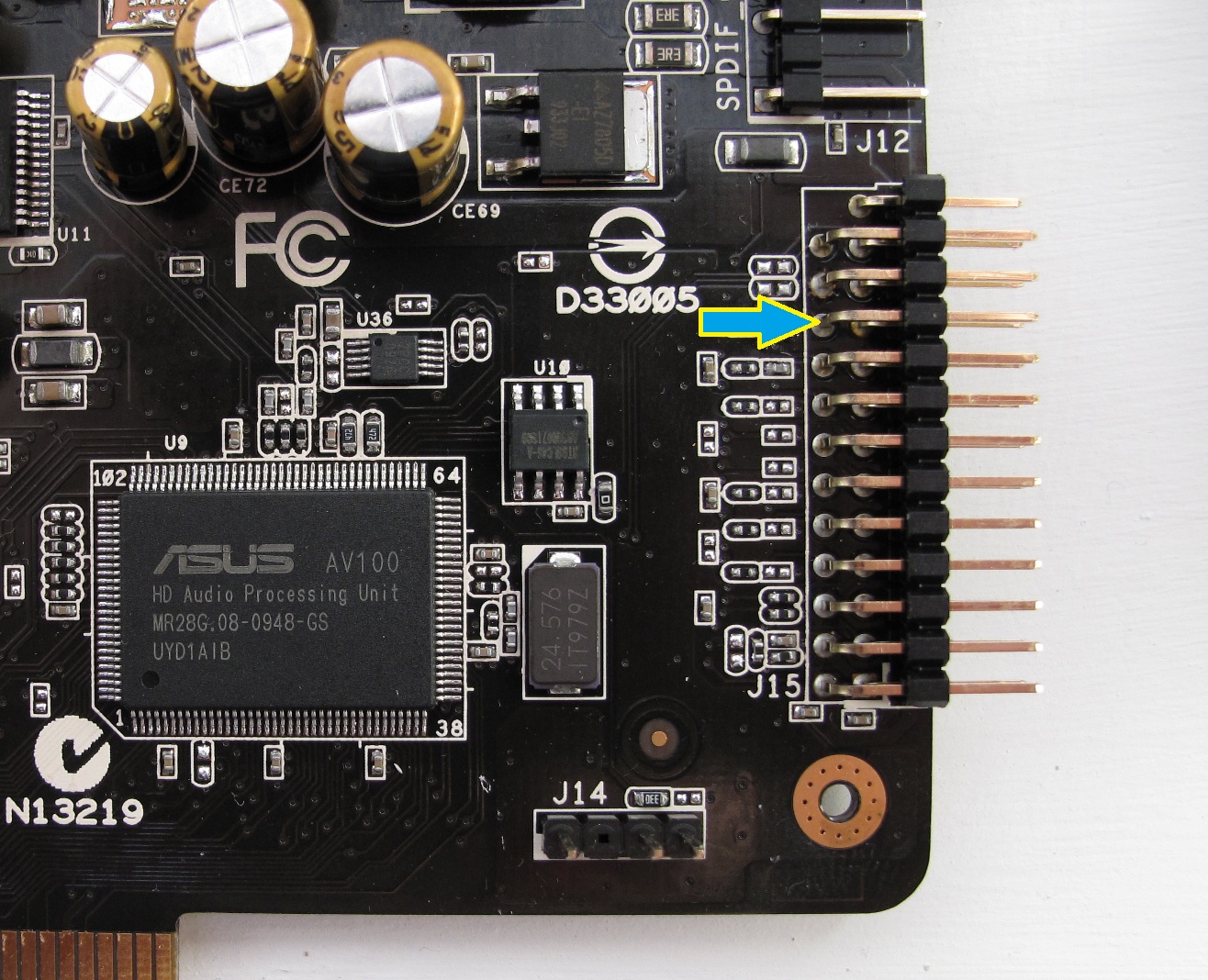
First off here's a picture of a section of the ST card, showing the AV100 chip, header and a few of the surrounding chips. The crystal oscillator is obvious, the CS2000 chip is the small 10 legged thing above and on the right hand side of the AV100.
The arrow indicates the pin that carries the master clock. The pin below it carries the bit clock and the pin below that carries the LR clock.
Now for the data line

The easiest and least invasive way to tap this is via the reverse side of the card.
The picture here shows a wire soldered onto the correct 'via' that goes from one side of the board to the other. This is almost directly behind the PCM1792 on the front side so you shouldn't have too much trouble locating where this is at.
Above the via I simply scraped off some of the board coating to reveal the copper ground plane beneath and soldered the shield directly to this.
All the settings I've changed to 24bit 192KHz. Is this normal?
This doesn't matter if you are using true ASIO as it bypasses everything.
If however you're not using ASIO then you must have all the sampling frequencies set to the sampling frequency that the player is going to output.
For example, if you've got foobar using the direct sound output and you're playing a CD @ 44.1khz.
In this example you have to set the soundcard to 44.1khz using the Asus software. But also you must go into control panel and load up what's called 'sound' in Windows 7 and change the 'Playback' settings to 44.1khz too.
Likewise if you decided you wanted to use the foobar resampler to upsample to 96khz, then you need to set everything to 96khz.
Foobar has ASIO support and if you've got the latest beta drivers from ASUS then you can select bit perfect ASIO as the output.
I've been looking into this a little more regarding the CS2000.
It requires two independent input clocks.
One is the timing reference that it uses to synthesize the new clock. The quality of this clock is of some importance, rubbish in rubbish out etc.
The second is the frequency reference although I'm not entirely sure what this is used for.
At any rate, the timing reference the CS2000 uses is the clock provided by the Cmedia chip on its master clock output. The master clock for the DACs.
I would imagine that the multiplier used is x1 inside the CS2000. It simply re synthesizes the master clock frequency, hopefully providing a lower jitter clock then the Cmedia chip creates by itself.
That much aside I'm not entirely sure what the frequency reference is used for. It is connected to one of the ADC master clock outputs.
This is one feature of the Cmedia chips they have several ADC inputs and each can operate at different sampling frequencies.
Now of course it might just be that the output of the ADC master clock, as provided to the frequency reference pin, follows the same frequency as the DACs master clock. Therefore the comparison between the frequency reference and the output PLL would be at a ratio of x1 and boom = success.
The reason why I am wondering all of this is that the control data from the micro controller that controls the CS2000 is present on the header. It would therefore be quite easy to have a CS2000 next to each DAC chip, which I'd have thought would bring about some minor improvements.
It requires two independent input clocks.
One is the timing reference that it uses to synthesize the new clock. The quality of this clock is of some importance, rubbish in rubbish out etc.
The second is the frequency reference although I'm not entirely sure what this is used for.
At any rate, the timing reference the CS2000 uses is the clock provided by the Cmedia chip on its master clock output. The master clock for the DACs.
I would imagine that the multiplier used is x1 inside the CS2000. It simply re synthesizes the master clock frequency, hopefully providing a lower jitter clock then the Cmedia chip creates by itself.
That much aside I'm not entirely sure what the frequency reference is used for. It is connected to one of the ADC master clock outputs.
This is one feature of the Cmedia chips they have several ADC inputs and each can operate at different sampling frequencies.
Now of course it might just be that the output of the ADC master clock, as provided to the frequency reference pin, follows the same frequency as the DACs master clock. Therefore the comparison between the frequency reference and the output PLL would be at a ratio of x1 and boom = success.
The reason why I am wondering all of this is that the control data from the micro controller that controls the CS2000 is present on the header. It would therefore be quite easy to have a CS2000 next to each DAC chip, which I'd have thought would bring about some minor improvements.
"The 24.576Mghz crystal is connected to the Cmedia chip in the usual way. With this the Cmedia chip generates all the clocks it needs to function and in return, outputs a master clock, bit clock, LR clock and the data line."
As I said they must use a PLL at a minimum to create the 44.1 clock chain. There is no direct way to generate the other clock chain. PLL's can be good but they are very hard to make very low jitter. Done digitally in a chip makes it extremely hard to do. The biggest challenge is close in jitter, below 1 KHz. Low jitter (low phase noise) at low frequencies requires a low corner frequency and long settling times which are difficult for a product like this.
Does your M Audio output SPDIF at 176.4 KHz? When I last had one (years ago) it didn't support that sample rate. None of the other cards using the Via chip that I have looked at support 176.4 directly. Via has acknowledged this issue to me as well.
Which Asus card are you showing? I tried looking at the Asus site but its a mess to get any details from.
As I said they must use a PLL at a minimum to create the 44.1 clock chain. There is no direct way to generate the other clock chain. PLL's can be good but they are very hard to make very low jitter. Done digitally in a chip makes it extremely hard to do. The biggest challenge is close in jitter, below 1 KHz. Low jitter (low phase noise) at low frequencies requires a low corner frequency and long settling times which are difficult for a product like this.
Does your M Audio output SPDIF at 176.4 KHz? When I last had one (years ago) it didn't support that sample rate. None of the other cards using the Via chip that I have looked at support 176.4 directly. Via has acknowledged this issue to me as well.
Which Asus card are you showing? I tried looking at the Asus site but its a mess to get any details from.
Ah you were referring to S/PDIF. I have no idea if the Maudio can, if the Juli@ needed something special to make that happen then I doubt the Maudio did.
It's the Asus Xonar Essence ST.
I've wired the scope up to the ADC output clock and it appears the CS2000 multiplies the clock by x2 to produce it's master clock.
I know that the PCM179x series of chips do not require the master clock to be in phase with the other clocks, so this makes sense, however...
I thought the point of replacing the clock in a CD player with a much better device was so that all the digital circuitry functions from that 1 very accurate clock.
In other words the creation of the bit clock, LR clock and the data stream would all improve as a direct result. Is this not the entire story?
I can see how providing a slightly better master clock to a DAC chip alone could maybe improve the sound quality. But if the Cmedia chip, that generates the bit clock, LR clock and data lines, is still generating them based on its own internal PLL, wouldn't half of the point of using the CS2000 be wasted? Or does simply supplying the DAC with a good clock sort all of this out?
It's the Asus Xonar Essence ST.
I've wired the scope up to the ADC output clock and it appears the CS2000 multiplies the clock by x2 to produce it's master clock.
I know that the PCM179x series of chips do not require the master clock to be in phase with the other clocks, so this makes sense, however...
I thought the point of replacing the clock in a CD player with a much better device was so that all the digital circuitry functions from that 1 very accurate clock.
In other words the creation of the bit clock, LR clock and the data stream would all improve as a direct result. Is this not the entire story?
I can see how providing a slightly better master clock to a DAC chip alone could maybe improve the sound quality. But if the Cmedia chip, that generates the bit clock, LR clock and data lines, is still generating them based on its own internal PLL, wouldn't half of the point of using the CS2000 be wasted? Or does simply supplying the DAC with a good clock sort all of this out?
Reading up on the CS2000 suggests it a very interesting chip. The two inputs make sense if you have some inderstanding of the core function. The frequency reference is the low jitter/noise master clock the PLL reference its output to. The frequency reference is used to determine the desired output frequency. Think of it as a frequency counter that passes a number to the pll to set itself to. The combo speed the lock to a specific frequency. Still the lowest jitter is listed as 50 pS RMS and 175 pS wideband all above 100 Hz. Those aren't bad numbers but a crystal can be significantly lower. The part is really targeted at multimedia applications where you need a lot of frequencies for video.
Reading up on the CS2000 suggests it a very interesting chip. The two inputs make sense if you have some inderstanding of the core function. The frequency reference is the low jitter/noise master clock the PLL reference its output to. The frequency reference is used to determine the desired output frequency. Think of it as a frequency counter that passes a number to the pll to set itself to. The combo speed the lock to a specific frequency. Still the lowest jitter is listed as 50 pS RMS and 175 pS wideband all above 100 Hz. Those aren't bad numbers but a crystal can be significantly lower. The part is really targeted at multimedia applications where you need a lot of frequencies for video.
Do you know of any other products that would be more suited and work in a similar-ish way?
And I suppose would it be worth it?
I think the CS2000 is a good solution for this as its an "any rate" synthesizer so it can generate all the necessary clocks. Depending on the DAC chip architecture either the master clock or the bit clock are the critical clocks that the samples are referenced to. The Cmedia chip must create the other clock/data signals for the i2s interface since they are deeply married to the internal logic. I suspect that the cmedia needs the master clock to run and the CS2000 generates the other clocks (much like the fpga on the Juli@ card does).
What I would do to make a significant improvement on this (without major surgery) is get the supply noise on the critical logic as low as possible. It translates directly into jitter even on digital logic. Pulling the I2S out will get better performance than spdif can, but ideally a phase locked crystal at the input to the dac will help (if you can work around the sample rate switching issues). Fortunately PC sample rate converters are synchronous so once locked to a clock they will stay locked. The Jitter from the CS2000 is lowest at certain frequency ratios (see the datasheet for the math) so probably a multiple of 48 will give the best results. However don't expect the PC sample rate converters to be perfectly transparent.
What I would do to make a significant improvement on this (without major surgery) is get the supply noise on the critical logic as low as possible. It translates directly into jitter even on digital logic. Pulling the I2S out will get better performance than spdif can, but ideally a phase locked crystal at the input to the dac will help (if you can work around the sample rate switching issues). Fortunately PC sample rate converters are synchronous so once locked to a clock they will stay locked. The Jitter from the CS2000 is lowest at certain frequency ratios (see the datasheet for the math) so probably a multiple of 48 will give the best results. However don't expect the PC sample rate converters to be perfectly transparent.
I suspect that the cmedia needs the master clock to run and the CS2000 generates the other clocks (much like the fpga on the Juli@ card does).
The CS2000 chip in this instance generates the master clock directly and feeds it into the master clock input on the DAC chip. That is it. Nothing more nothing less.
What I would do to make a significant improvement on this (without major surgery) is get the supply noise on the critical logic as low as possible. It translates directly into jitter even on digital logic.
By this I guess you are referring to the power supplies that feed the Cmedia chip and the CS2000?
I will have a look into how easy it would be to power them from their own power supply. I think the Asus card simply uses the power from the PCI socket. At least I haven't seen any 3.3 volt regs anywhere on board. I've got a 3.3 volt super regulator for supplying my PCM1794s anyway, so a low noise supply is close by.
Pulling the I2S out will get better performance than spdif can, but ideally a phase locked crystal at the input to the dac will help (if you can work around the sample rate switching issues).
This is unfortunately the problem I have run into before when looking into reclocking. I want to keep the ability to swap sample frequencies on the fly.
Although having said that a single 24.576 master clock would work with 48, 96 and 192khz.
- Status
- Not open for further replies.
- Home
- Source & Line
- PC Based
- SPDIF Sound Card Choice