

as rePhase has evolved a lot since day one of this long thread, it is certainly not a good starting point to understand what rePhase does and what its current state of development is. It is nonetheless a good place to ask questions, report bugs, or request features.
This first post is kept up-to-date with links and a change log for the current version of rePhase.
Here is the rePhase project page from where the last version can be downloaded.
It also list a few interesting tutorials.
enjoy 🙂
original post:
Here is a little piece of software I have been working on for some months now.
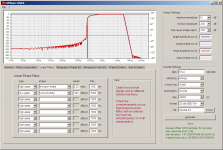
It is called rePhase, and is a tool for loudspeaker phase linearization, EQ and FIR filtering.
It does so by producing correction impulse responses that you can then use in your favorite convolution engine.
It is a free software, without restriction (but without warranty either).
Download: rePhase project page
At start the first goal of rePhase was to let you generate impulses specifically tailored to reverse the phase shifts introduced by the crossovers of your loudspeakers (passive or active) and boxes, resulting in a linear-phase system.
It is similar to phase arbitrator in this regard (but it is not a processing plugin, just an impulse generator).
rePhase has evolved and now includes other features: it can generate linear-phase EQ and crossover filters of arbitrary slopes, including Linkwitz-Riley (albeit linear-phase) and Horbach-Keele shapes.
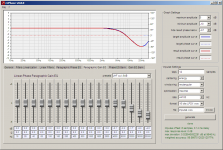
With the paragraphic EQ sections you can alter phase and amplitude independently.
You will need a convolution engine to run the generated impulse, such as the minidsp openDRC, foobar2000 convolver or VST convolver, among many other software and hardware tools.
You can use rePhase to linearize passive loudspeakers, active ones, and turn IIR active crossovers into linear-phase crossovers (turn a DCX2496 into a DEQX or a Dolby Lake 😉 ).
You can also design the whole filter with rePhase.
In any case you will need one convolution per way (Jriver can be used to run the convolutions for example)
Features include:
- generate impulse responses (FIR) for convolution engines
- measurement import and real-time correction
- loudspeakers phase linearization (passive or active crossovers)
- linear-phase and minimum-phase gain paragraphic EQ and shelving
- constant-gain phase praragraphic EQ
- multiple gain EQ algorithms (constant Q, proportional Q, constant shape, raised cosine)
- arbitrary slopes linear-phase filters (Linkwitz-Riley, Brickwall, Horbach-Keele, etc.)
- arbitrary slopes minimum-phase filters (Linkwitz-Riley, Butterworth, etc.)
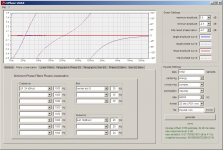
- real-time graphical monitoring of target and results curves
- automatic optimization for the best result with a given number of taps
- multiple windowing choices
Sorry for the lack of documentation.
Questions, remarks and suggestions are welcome!
Changelog:
Code:
1.4.3 2019-01-16
  Bug corrections:
    - after loading a preset, correctly show "rotate" option when set in
      Filters Linearization tab
    - resolved the zoom out (right click) bug where too much zoom states
      were added
  Adjustments:
    - measurement interpolation is now logarithmic in both magnitude and
      frequency axes, so that an interpolation between two points will
      always show as a straight line

1.4.2 2018-12-27
  Bug corrections:
    - corrected graphical EQ manipulation behavior when gain offset is used
      on a measurement
    - corrected active EQ focus bug after loading a measurement

1.4.1 2018-12-23
  Adjustments:
    - improved compatibility of frd format:
        * enforce decimal form instead of scientific notation
        * use semicolon instead of tabulation as column separator
        * add commented info (software, url, columns description)
    - improved information in EQ bank drop-down menu, including EQ type and
      number of bypassed EQs
    - dynamically adjusted choices in FFT drop-down menu, removing unusable
      options
    - removed unused EQ type drop-down menus in paragraphic phase EQ tab
    - reworked links and contact info

1.4.0 2018-12-19
  New features:
    - graphical zoom functionality, similar to HOLMImpulse:
        * clicking and dragging the mouse over the response graph draws a
          zoom box that defines the new graph area when button is released
        * right clicking cancels last zoom operation
        * zoom only affects frequency and magnitude scales, not phase one
    - real-time graphical edition of gain EQ points:
      clicking an EQ fader or entries will turn them yellow to reflect the
      fact that this particular EQ point now has a special focus:
        * mouse wheel changes its Q value while on the response graph
        * middle click or ctrl-click on the response graph updates its
          freq and dB values in real-time while the button is held pressed
        * dB position is relative to the existing target magnitude curve,
          including optional measurement, and is limited to ±96dB per EQ
          (note: it is recommanded to use "constant shape" EQ type for
          high amplitude corrections)
        * modifications can be cancelled as long as focus is not lost
    - "frequency response (.frd)" format to export the generated correction
      (ie the red curves) as a three columns frequency/magnitude/phase file
    - Added "linearize"/"rotate" option in Filters Linearization tab.
      "linearize" is the default and compensates for phase rotation of a
      given filter (inverse all-pass), whereas "rotate" emulates the phase
      rotation of the chosen filter without affecting magnitude (all-pass).
    - New "throughout banks" EQ tools to bypass or order EQ points
      throughout all banks at once. Confirmation is requested as this can
      be an irreversible operation. Ordering EQ points between different
      banks requires EQ types to be identical in all banks.
    - try to let the user save current settings before exiting in case of a
      crash
  Adjustments:
    - frequency marker on the magnitude target curve is replaced with a
      vertical yellow line that reflects both magnitude and phase
      corrections
    - up/down key binding on drop-down menus to iterate values (same idea
      as existing incrementation/decrementation of entries with numerical
      values)
    - link to rephase.org in Help menu
    - stay in same tab after settings load/reset
    - more compact setting file
    - view preferences are saved on the fly instead of when quitting
    - force entry focus loss when switching tab
    - added Nyquist frequencies of a few common sampling rates in frequency
      upper limit choices in the Range tab
    - removed bypassed EQs from EQ points count in "Bank" drop-down menu
    - avoid saving measurement summary in the setting file, and generate it
      on the fly

1.3.0 2018-02-15
  New features:
    - "Load Recent Settings" entry in File menu, keeping track of the last
      15 opened or saved setting files
    - ctrl-click on a fader will reset its value to zero, similar to what a
      middle click does (useful for persons using a mouse pad)
    - improved measurement parsing heuristics to handle more formats;
      recommended measurement format is still the one described in the info
      box when failing to load a measurement
    - added CSV output format: 64 bit floating-point values in text format,
      separated with commas
    - allowed measurement importing from clipboard, both from File menu
      and Measurement tab
    - added "hide magnitude" button in Measurement tab
  Adjustments:
    - added a "Donate" entry in Help menu linking to a paypal donation page
    - made "Load Settings From Clipboard" functionality tolerant to leading
      and trailing spaces and newlines in clipboard
    - reworked output format names
    - renamed "invert" button to "invert response" for clarity in
      Measurement tab
    - rename "impulse offset" to "impulse delay" for clarity in impulse
      status report
    - add max impulse level in impulse status report, complementing max
      response level
    - reworked impulse and measurement status report areas to make them
      more visible
    - enabled DPI adaptation if forced to by the operating system (not
      recommended, looks nice but crashes might occur), and added scale
      ratio and DPI indication in View menu
    - added a no warranty disclaimer in "About" info box

1.2.0 2016-12-08
  New features:
    - REW automated EQ settings generated using the 'rePhase' equaliser
      type (as implemented in REW V5.17 beta 14 and up) can now be imported
      directly into a paragraphic EQ bank
    - EQ points in paragraphic EQ tabs can now be individually bypassed
    - added a "tools" menu in paragraphic EQ tabs, effective on current
      bank:
      * load/save current bank into a '.eq' file as a JSON object
        (gain paragraphic EQ tab only)
      * load/save current bank into the clipboard as a JSON object to
        easily copy it to other banks or rePhase instances, or share it
        through forum posts
        (gain paragraphic EQ tab only)
      * import REW EQ settings generated with 'rePhase' equaliser type
        (gain paragraphic EQ tab only)
      * convert back and forth between constant and proportional Q types
        (gain paragraphic EQ tab only)
      * invert corrections
      * bypass or activate all EQ points
      * order by frequency, active or reversed order
    - "Help" menu entry (albeit probably not very helpful :( )
  Bug corrections:
    - The long lasting encoding issues with paths when loading, saving, and
      generating files should now at last be solved. It was already
      supposed to be the case in version 0.9.7, then 1.1.0, and should now
      *at last* be effective. Please report any problem with files or paths
      containing special characters (accents, etc.).
    - Corrected a bug introduced in version 1.1.1: fader position could
      sometimes change based on the position of the mouse cursor after
      loading or saving a file
    - Stop confining mouse cursor within faders, as it could stay stuck
      under some rare circumstances
  Adjustments:
    - set default optimization setting to none, as optimization process can
      increase preringing and should only really be used when the number of
      available taps is too limited to obtain the desired magnitude curve
    - increased default number of taps to 16384 to reflect an increase in
      CPU and DSP power in the last few years (wishful thinking? :) )
    - boost FFT length calculation ratio to improve precision
    - changed default windowing algorithm from rectangular to hann for a
      more generic default behavior
    - EPS vector files screenshots including result curves are now
      significantly lighter and result in smoother curves compared to
      versions 1.1.0 and 1.1.1
    - suppressed flickering when switching between Views buttons
    - default to "Large" view mode

1.1.1 2016-10-29
  New features:
    - added a 64 bit IEEE-754 output format to accommodate BruteFIR:
      [url=http://tinyurl.com/htqvln8]rePhase, a loudspeaker phase linearization, EQ and FIR filtering tool - Page 124 - diyAudio[/url]
  Bug corrections:
    - fader focus bug solved: [url=http://tinyurl.com/ztbp7cl]rePhase, a loudspeaker phase linearization, EQ and FIR filtering tool - Page 123 - diyAudio[/url]
    - beefed-up clipboard handling to avoid bugs when loading measurements
      by dragging them over the interface: [url=http://tinyurl.com/jygt7jx]rePhase, a loudspeaker phase linearization, EQ and FIR filtering tool - Page 125 - diyAudio[/url]
    - removed the final optimization step that was recently added in
      version 1.1.0 as it had some ill side effects in specific scenarios
  Adjustments:
    - renamed measurement "compensate" function to "invert" to avoid
      confusions: [url]http://tinyurl.com/j76wm5w[/url]
    - reworked focus and entries editing in paragraphic EQ tabs:
        * using the tab key now goes from one entry to the other as
          expected, making it faster to edit multiple EQ points in a row
        * clicking on an entry does select the entire content for ease of
          editing
        * middle click or double left click on the dB/° entry used to reset
          the value to 0. This is now gone, but the same result can still
          be achieved with a middle click on the fader
    - internal DPI scaling adjustments

1.1.0 2016-10-27
  New features:
    - screenshot functionalities added to the file menu:
        * "Save Graph Screenshot As..." saves current graph view with a
          logo added to the bottom right corner
        * "Save Window Screenshot As..." saves current window view with the
          directory entry hidden for anonymity concerns
        * supported bitmap file formats are PNG, GIF and JPEG
        * graph screenshot also supports EPS vector file format
    - 64 bits output formats handling (mono/stereo IEEE wav, txt)
    - All-Pass filters added to the Minimum-Phase Filters tab
    - measurement compensate mode to manually replicate a given measurement
      (eg replicating a mic calibration file and getting its missing
      minimum-phase response, replicating a target curve, etc.)
    - added a "Clear Result" entry in the File menu, clearing result curves
      and status
    - reworked "what's new" changelog window to make it easier to read
  Removed features:
    - removed "complex" windowing algorithm which was deprecated since
      version 0.9.0
      An alert box will popup when loading settings using it
  Bug corrections:
    - bug correction for 2nd order minimum-phase filters with Q<0.5
      An alert box will popup when loading settings containing that bug
        * bug report: [url]http://tinyurl.com/z59qw4t[/url]
    - filename encoding bugfix: accents and other special characters
      handling in setting, impulse, and measurement filenames and paths
      (was supposed to be resolved since 0.9.7, but was not...)
    - last updated graph setting sometimes remained unchanged after
      resetting or loading new settings
    - fixed a few instabilities:
        * Horbach-Keele filters with R=1
        * clipboard corner case errors
        * NaN detection bugs
    - fixed various graphical bugs:
        * generation status remaining after reset
        * misbehaved result phase curve when hide=-Inf
        * view slots flickering in large view mode
  Adjustments:
    - faster constant Q, proportional Q and constant shape EQs calculation:
      should be around three times as fast now, and should be notable when
      manipulating EQ faders as well as during the first generation step
      when a lot of EQ points are used
    - added "Pano Phase Shuffler" presets in the Paragraphic Phase EQ tab
        * source: [url]http://tinyurl.com/pano-shuffler[/url]
        * settings: [url]http://tinyurl.com/pano-shuffler-preset[/url]
    - status text under the generation button
    - added a final optimization step in moderate/extensive/maximal modes
      with a correction factor set to 1
    - added ± 15dB and ± 18dB ranges for convenience in paragraphic EQ tab
    - increased EQ dB precision from 0.1dB to 0.01dB for manual editing
    - set default optimization floor to -100dB
    - faster startup time
    - made clear the fact the subsonic filters linarization options were
      based on optimized approximations (cf [url]http://tinyurl.com/hslsb8m[/url] ) by
      by naming them as such and adding "textbook" versions for the most
      reckless users :)

1.0.0 2015-06-25
  New features:
    - Albrecht cosine windows implementation
      Ref: A Family of Cosine-Sum Windows for High-Resolution Measurements
    - multiple memory slots in range settings to be able to quickly go from
      one view to the other and focus on different aspects of the response
      curves
      These slots are preset with (hopefully) useful values but can be
      manually modified and copied.
    - "Load Settings From Clipboard" and "Save Settings To Clipboard" menu
      entries in order to be able to easily share corrections on web forums
    - frequency marker for the last correction point (5 sec persistence)
    - fader values can now be manually edited to arbitrary values
  Bug corrections:
    - bug correction in Minimum-Phase Filters tab: the polarity of low-pass
      Linkwitz-Riley filters of order 2(2n+1) was reversed
      (eg 12dB/oct, 36dB/oct, 60dB/oct, 84dB/oct, etc.)
      A warning will be emitted when loading correction files from prior
      versions using an odd number of such filters, as the polarity will
      now be correct and reversed compared to the prior bogus correction.
    - bug correction with higher than normal noise floor with even order
      taps (introduced in version 0.9.9 while solving a similar problem
      for odd taps numbers!)
    - bug correction with txt output file with 0.000(...)0 values
      (especially pregnant when using Hann window)
    - correction of the bogus flat top window implementation
    - corner case instabilities corrections (undue octal conversions on
      some value entries)
  Adjustments:
    - set "32 float txt" as the default output format instead of "32bit
      LPCM wav" in order to avoid  rising the result noise floor because of
      the fixed point format
    - added de-empahasis and pre-emphasis presets in the Paragraphic EQ tab
    - added Linkwitz-Riley linearization orders 11th to 16th (why not?)
    - reduce default phase EQ range to ± 45° (was ± 90°) and removed
      unpractical ranges
    - increase default EQ range to ± 12dB (was ± 6dB)
    - added 384 and 352.8kHz sampling rates as drop menu options for ease
      of use (any other value can still be manually entered)
    - got rid of the "Curves" tab for the time being, waiting for the
      capture functionality to be implemented in some future version...

0.9.9 2014-12-10
    - shelving EQs with variable Q in Paragraphic EQ tab, with associated
      monotonic high and low shelv presets
    - centering can now be manually set to values in samples, percentage,
      time (us/ms/s) and distance (mm/cm/m).
      It is also possible to add or subtract several values, for example
      "middle+270us"
    - new centering adjustment layout:
        * 'float' is now 'use closest perfect impulse' and is explicitly
          recommended
        * 'int' is now 'round to closest sample'
        * 'use exact centering value' has been added for exact delays
    - 32 bits IEEE-754 float WAV output format added
    - output format noise floor is now shown in result curve
    - improved impulse and windowing symmetry, especially when an odd taps
      value is used
    - import/clear measurement file menu entries
    - fix partial installation catch

0.9.8c 2014-09-29
    - correction of a bug introduced in version 0.9.8 for closed-box phase
      linearization

0.9.8 2014-09-28
    - minimum-phase filters tab with common IIR filter types:
        * 1st order
        * 2nd order with arbitrary Q
        * Butterworth with slopes ranging from 6dB/oct to 996dB/oct in 6dB
          increments
        * Linkwitz-Riley with slopes ranging from 12dB/oct to 996dB/oct in
          12dB increments
    - 'compensate' mode for generalized arbitrary order Linkwitz
      Transform-like manipulations in minimum-phase filters tab
    - new centering options expressed as a percentage to easily obtain
      matched delays
    - default to "middle" centering instead of "energy" to avoid delay
      mismatch problems for the unaware user (principle of least surprise)
    - praxis measurement format handling, scientific notation in frequency
      column
    - smaller executable, new installation method
    - bug correction: crash on impulse generation with some specific filter
      settings
    - directory handling bug correction
    - measurements can now be loaded from the command line or drop on exe,
      similarly to settings
    - revamped file extension handling (settings)
    - revamped icon
    - smoothed out taps/fft size calculation

0.9.7 2013-09-03
    - Brickwall filters implementation.
      /!\ result slope relies solely on windowing /!\
      Iterative optimization and energy centering algorithms are
      automatically defeated when a brickwall filter is set, to make it
      possible to build complementary crossovers. It is up to the user to
      make sure he uses the exact same number of taps and same windowing
      algorithm on both sides of the crossover to ensure complementarity
    - sampling rate drop down menu can now also be directly edited to input
      arbitrary values, so menu options have been reduced to the most
      common values for clarity and ease of use
    - frequency, amplitude and phase ranges can now also be set to
      arbitrary values
    - optimization floor can now be set (was -40dB fixed)
    - B-weighting in optimization calculation was removed (for now)
    - new amplitude paragraphic presets with fixed frequencies (1kHz) for
      various Q values (0.5, 1, 2, 4, 8, 16)
    - got rid of scientific notation in txt output format to broaden
      compatibility
    - dark graph theme
    - various graphical bugs resolution
    - C float array output formats
    - filename encoding bugfix: accents and other special characters
      handling in setting and measurement filenames
    - "reject" filter slopes bugfix
    - "Save Settings" menu option
    - "Save modifications" dialog box before loading/resetting/exiting
    - window title now shows the settings name instead of the impulse name
    - updated 'tips' in Linearization and filtering tabs

0.9.6 2013-04-16
    - show frequency, amplitude and phase from current cursor position in
      graph
    - improved measurement handling:
        * drag and drop loading
        * loading speed up (twofold increase)
        * gain and time offset settings
        * polarity inversion and phase hiding functionality
        * bypass option
        * description: name, number of points, frequency and dB ranges
        * ARTA format handling (trailing spaces in frequency column)
    - Save measurement inside *.rephase settings files together with
      corrections and other parameters
    - new 'constant shape' EQ, both for linear-phase and minimum-phase EQ.
      Equivalent to a constant Q EQ at 6dB, it keeps exactly the same shape
      at any dB setting. It should be preferred to constant Q and
      proportional Q at high dB settings as those two are bound to their
      2nd order definition and have to stay within a ±90° phase range,
      thus leading to odd gain shapes at high dB settings...
    - "What's new" menu entry, exposing this changelog, instead of having a
      separate REDAME file
    - bugfix when loading settings from version prior to 0.9.2: filter
      frequencies were lost
    - going back to forced 'middle' in energy centering when only
      linear-phase corrections are used
    - curve capture functionality teasing...

0.9.5 2013-04-06
    - measurement import implementation, following HOLMImpulse import rules
      and interpolation strategy
      (first draft with limited functionality)
    - Nyquist frequency is now explicitly represented in gain result curve
      as a brickwall low-pass
    - result curves are now cleared upon settings reset or loading
    - improved energy centering algorithm
    - stop forcing energy centering to middle when only linear-phase
      corrections are in use
    - middle click on a fader reset its value to 0
    - bugfix for result phase curve unwrapping
    - bugfix on curves when polarity is inverted and a phase range larger
      than ±180° is chosen
    - bugfix for 1st order high-pass filters

0.9.4 2013-03-16
    - crash at start problems (previsously requiring temp/ dir content to
      be deleted) should now be solved
    - up to 16 banks can now be used in paragraphic gain and phase EQ
    - removed bank EQ tabs (settings saved with banks EQ will be
      automatically reported to paragraphic EQ banks)
    - improved graph range options: frequency and phase range can now be
      set and saved in settings
    - new phase wrapping implementation, automatically adapted to current
      phase range
    - view mode (compact/normal/large) is now automatically saved and
      restored from one run to the next
    - double-click on a fader value entry reset the fader to 0
    - improved raised cosine EQ. Interactions between EQs should now behave
      exacly like the "Ideal Graphic Equalization" exposed here in this
      application note: [url]http://www.nordicsales.dk/imgdb/docs/lakewh_981.pdf[/url]
    - better precision for frequency entries (fractional up to 5 chars
      total to fit the entry) and appropriate up/down key binding (0.1hz
      steps under 10hz)
    - real 2/3 and 1/3 octave frequencies in paragraphic EQ sections
      (mandatory to make the raised cosine graphical EQ "magic" work...)
    - improved biquad precision (constant Q and proportional Q EQs) by
      adapting the sampling rate of each biquad to its fc
    - increased Q range (0.1 to 100)
    - improved phase deg precision in paragraphic EQ
    - added ESS sabre frequencies

0.9.3c (misnamed 0.9.31) 2013-01-29
    - mini bugfix for the taps entry...

0.9.3 2013-01-29
    - new Paragraphic EQ implementation, with multiple EQ types:
        * constant Q minimum-phase (new default)
        * constant Q linear-phase
        * proportional Q minimum-phase
        * proportional Q linear-phase
        * constant slope linear-phase (former implementation)
        * raised cosine linear-phase (beta version...)
      ( bank EQ section remains constant slope linear-phase )
    - FFT size can now be set by user (minimum size is two times the
      smallest power of two equal or bigger than the requested number
      of taps). Setting a larger FFT size makes generation and optimization
      slower, but can increase the precision of the optimization and also
      makes result curves more precise (just a visual effect for that one
      though: no effect on the actual impulse)
    - bug correction: negative gains can now be entered directly from
      the keybord in the Gain EQ Bank tab.
    - exit on repeated errors to avoid "panic mode" effect

0.9.2 2012-11-04
    - added back '24bit LPCM mono' output format, missing since 0.9.0
    - improved up/down key bindings on frequency entries
    - added up/down key bindings for taps entry, with color warnings for
      extreme values
    - new '1st order' and '2nd order' linear-phase filters, meant to be
      combined with an existing (and already corrected in phase) rolloff
      to obtain a linear-phase acoustical Linkwitz-Riley filter
    - made sure 'middle'+'float' centering ends up within -0.5/+0.5 sample
      from middle (was -1/+0.5)

0.9.1 2012-10-29
    - centering 'int' option was not working, this is now fixed
    - more explicit error message when loading a wrong setting file

0.9.0 2012-10-28
    - new file format '.rephase', saving/loading all settings, including
      correction settings, impulse settings, and graph settings
      (old '.jason' files can still be loaded, but impulse and graph
      settings get reset)
    - impulse file is now a three-part thing: directory, filename, and
      format extension. The directory is the only thing that is not saved
      in the '.rephase' file
    - '.rephase' files can be loaded upon start (as a parameter or by drag
      and drop on rephase.exe) or by drag and drop on the user interface
    - new offset option "float" for fractional sample centering, avoiding
      HF ripples in the impulse when the phase target is not a multiple
      of 180° at the Nyquist frequency
    - make "rectangular" the default window function: this should be the
      best choice for phase-only corrections, and "complex" windowing is
      not needed anymore with the "float" offset
      Note: "rectangular" window is still likely to be the worst choice
      for filter generation, when gain target goes far below 0dB...
    - new "ovelapping" filters, to be used for example in the midbass
      region, under Schroeder's frequency...
    - stereo wav formats are now available
    - bug correction in offset calculation in time=inv mode

0.8.4 2012-10-14
    - new time inversion option in general tab, to reverse the generated
      impulse, thus opposing phase corrections. This can be used to better
      visually track a phase target (inverse during correction, and return
      to normal before generating the impulse), or to evaluate the
      audibility of a given correction with headphones for example (in this
      case the convolution of the impulse will simulate the speaker before
      correction)
    - confirmation box when exiting whithout saving modified correction
      settings, and avoid asking for confirmation on reset when correction
      where saved or loaded without modification
    - Improves advice section in the linear filter tab, and add one in the
      linearization tab

0.8.3 2012-10-12
    - range choices in paragraphic EQs (up to ± 48dB and 720°)
    - improve arrow keys binding after click in faders
    - stop constraining frequencies to 16Hz-25khz in paragraphic EQs
      (now 1hz-99khz like in EQ banks)
    - ask for confirmation before resetting correction settings
    - bug correction when resetting settings ("wrong format")
    - stop using '.rephase' as default extension when saving an impulse

0.8.2 2012-10-07
    - try to play nice with multiple screens
    - new "large" layout, and "View" menu for layout choice
    - change Q interpretation for phase EQ to be more in line with gain EQ
      (to maintain an ascending compatibility, phase corrections saved from
      versions 0.8.0 and 0.8.1 get their Q divided by 1.8 upon loading)

0.8.1 2012-10-03
    - fix small bug with slope/ratio display when loading a FIR filter

0.8.0 2012-10-02
    - real-time amplitude/phase curves for both target and result
    - save/load correction settings (/!\ beware /!\, still experimental)
    - Horbach-Keele 'last' ratio (special tweeter) is now a different
      filter type for ease of use and clarity reasons
    - added some more window functions

0.7.6 2012-09-20
    - resolved (hopefuly) some issues with windows XP with the program
      refusing to actually start

0.7.5 2012-09-18
    - bug fix (crash during otpimisation step)

0.7.4 2012-09-16
    - bug corrections
    - optimization iterations are now faster
    - new optimization options ("moderate" and "extensive")
    - Horbach-Keele filters
      (ratio above 4.5 is the special "tweeter" ratio)
    - "Reject low" and "Reject high" filters for higher low or high rolloff

0.6.0 2012-08-26
    - first version on SourceForge
Attachments
Last edited:
Cool! I've been wondering if anyone was going to come out with software with this kind of capability for free 
I'm building new speakers right now and I'm an active xo kind of guy so hopefully I'll get some time to play with this this weekend.
Thanks!
I'm building new speakers right now and I'm an active xo kind of guy so hopefully I'll get some time to play with this this weekend.
Thanks!

Excellent!
I've been waiting for a phase EQ for some time, for transient (re-)shaping etc. I can do this, as well as lin-phase mag EQ, manually/iterative by EQ'ing diracs (with the time reversion trick) but a tool like this where you see what you get is of course much more convenient.
Did I miss something and one cannot load a pulse and apply your analytical correction on it (as an overlay on the graph) and see the result change directly instead of adjust/generate/convolve/measure cycles? I know that means quite a bit of additional programming and convolution, but any simple (time domain) algorithm would do since we're not realtime. That would really be a killer feature.
While one can do basic phase (& mag) correction with just HolmImpulse and Excel, your tool is much more versatile, thanks for sharing!
I've been waiting for a phase EQ for some time, for transient (re-)shaping etc. I can do this, as well as lin-phase mag EQ, manually/iterative by EQ'ing diracs (with the time reversion trick) but a tool like this where you see what you get is of course much more convenient.
Did I miss something and one cannot load a pulse and apply your analytical correction on it (as an overlay on the graph) and see the result change directly instead of adjust/generate/convolve/measure cycles? I know that means quite a bit of additional programming and convolution, but any simple (time domain) algorithm would do since we're not realtime. That would really be a killer feature.
While one can do basic phase (& mag) correction with just HolmImpulse and Excel, your tool is much more versatile, thanks for sharing!
Excellent!
Did I miss something and one cannot load a pulse and apply your analytical correction on it (as an overlay on the graph) and see the result change directly instead of adjust/generate/convolve/measure cycles?
That's how it looks to me as well.
Hi
Thanks!
The possibility of importing a measurement into rephase (maybe only magnitude/phase curves, not a real impulse, to avoid impulse offset detection issues...) was on the work bench, but I am a little reluctant to add it: It would be too easy then to turn rephase into an automatic inverse correction tool (but without all the care that it would require to be made properly).
I would like to stay on the "manual" side with this tool.
That said, if things are made really clear for the user that no automatic correction must be made without a lot of car, then it could be an interesting addition.
By enabling the user to independently ignore or inverse the phase and amplitude of the measurement, it would also make it possible to import a correction from an external software like PORC, and "mix" (convolve) it with the current correction.
But importing measurements would still require an external tool such as HOLM to do the measurement and impulse offset detection though.
As it is now, to see the effect of a correction you can do the convolution inside HOLMImpulse, using the "C=A*B" manipulation : you put your measurement in one slot, the correction impulse in another, and you generate the result in the C slot.
So the correction cycle is quite easy to do: generate, import, convolve...
(and turning the optimization option to "none" to avoid waiting for its iterations every time...)
HOLM seems to be quite peaky with on some OS with this feature though...
On Win7 you have to import your impluse as a txt only (wav make it crash), and then convolution does not work all the time (sometime you even have to export and reimport your measurement as txt to make it work!).
It looks like it work without issue on XP though (IF you stay around 44khz or 48khz...)
Thanks!
The possibility of importing a measurement into rephase (maybe only magnitude/phase curves, not a real impulse, to avoid impulse offset detection issues...) was on the work bench, but I am a little reluctant to add it: It would be too easy then to turn rephase into an automatic inverse correction tool (but without all the care that it would require to be made properly).
I would like to stay on the "manual" side with this tool.
That said, if things are made really clear for the user that no automatic correction must be made without a lot of car, then it could be an interesting addition.
By enabling the user to independently ignore or inverse the phase and amplitude of the measurement, it would also make it possible to import a correction from an external software like PORC, and "mix" (convolve) it with the current correction.
But importing measurements would still require an external tool such as HOLM to do the measurement and impulse offset detection though.
As it is now, to see the effect of a correction you can do the convolution inside HOLMImpulse, using the "C=A*B" manipulation : you put your measurement in one slot, the correction impulse in another, and you generate the result in the C slot.
So the correction cycle is quite easy to do: generate, import, convolve...
(and turning the optimization option to "none" to avoid waiting for its iterations every time...)
HOLM seems to be quite peaky with on some OS with this feature though...
On Win7 you have to import your impluse as a txt only (wav make it crash), and then convolution does not work all the time (sometime you even have to export and reimport your measurement as txt to make it work!).
It looks like it work without issue on XP though (IF you stay around 44khz or 48khz...)
Last edited:
Hi pos,
I'm fine when you decide NOT to add the import because I understand your motives.
Even without that option the software is excellent, and it's for free which we appreciate very much.
I'm fine when you decide NOT to add the import because I understand your motives.
Even without that option the software is excellent, and it's for free which we appreciate very much.
New version 0.8.4, with a new "time: inv" option that can be used for ABX testing, to hear the effect of phase shifts form different filters at different frequencies with headphones for example (see changelog below).
Of course this option must not be used for normal filter linearizion, as it would double the original time shifts instead of correcting them 😱
Download: rePhase on sourceforge
Of course this option must not be used for normal filter linearizion, as it would double the original time shifts instead of correcting them 😱
Download: rePhase on sourceforge
Code:
0.8.4  2012-10-14
    - new time inversion option in general tab, to reverse the generated
      impulse, thus opposing phase corrections. This can be used to better
      visually track a phase target (inverse during correction, and return
      to normal before generating the impulse), or to evaluate the
      audibility of a given correction with headphones for example (in this
      case the convolution of the impulse will simulate the speaker before
      correction)
    - confirmation box when exiting without saving modified correction
      settings, and avoid asking for confirmation on reset when correction
      where saved or loaded without modification
    - Improves advice section in the linear filter tab, and add one in the
      linearization tab
Last edited:
rePhase 0.9.0 is online
Download: rePhase on sourceforge
Download: rePhase on sourceforge
Code:
0.9.0  2012-10-28
    - new file format '.rephase', saving/loading all settings, including
      correction settings, impulse settings, and graph settings
    - impulse file is now a three-part thing: directory, filename, and
      format extension. The directory is the only thing that is not saved
      in the '.rephase' file
    - new offset option "float" for fractional sample centering, avoiding
      HF ripples in the impulse when the phase target is not a multiple
      of 180° at the Nyquist frequency
    - make "rectangular" the default window function: this should be the
      best choice for phase-only corrections, and "complex" windowing is
      not needed anymore with the "float" offset
      Note: "rectangular" window is still likely to be the worst choice
      for filter generation, when gain target goes far below 0dB...
    - stereo wav formats are now available
- bug correction in offset calculation in time=inv modeReally need to allow import of real IR; hassles or not for user to get maximum utility from Paragraphic EQs.
Nice start to filter generation interface. Mostly more flexible than building filters with Audacity, but no match for Cool Edit.
Filters Linearization and Linear Filters:
Basic Linkwitz-Riley filter is cascaded Butterworth of appropriate order, to build linear phase version time reversal is simply done between applications of Butterworth.
So all-pass filter for desired frequency and order is generated and reversed in time.
I do this for Linkwitz-Riley 48dB/octave filter with your software, and import to Cool Edit for examination, and see you've done a pretty good job, but tail of result has ringing:
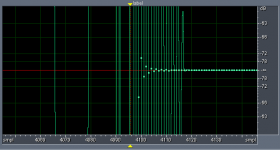
Ringing continues:
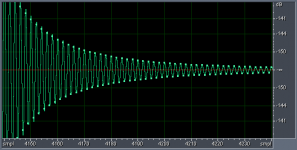
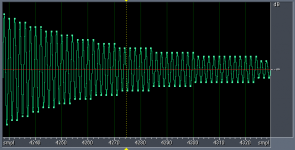
And continues with math truncating results to steps, before hitting noise floor of math, granted this is way below 24bit integer floor:
Yes, linearization of phase for active circuits, analog or digital may have benefits, but it is real driver/cabinet/room behavior that provides the details in phase behavior, so again being able to import real IR is way to go.
Andrew
Nice start to filter generation interface. Mostly more flexible than building filters with Audacity, but no match for Cool Edit.
Filters Linearization and Linear Filters:
Basic Linkwitz-Riley filter is cascaded Butterworth of appropriate order, to build linear phase version time reversal is simply done between applications of Butterworth.
So all-pass filter for desired frequency and order is generated and reversed in time.
I do this for Linkwitz-Riley 48dB/octave filter with your software, and import to Cool Edit for examination, and see you've done a pretty good job, but tail of result has ringing:
Ringing continues:
And continues with math truncating results to steps, before hitting noise floor of math, granted this is way below 24bit integer floor:
Yes, linearization of phase for active circuits, analog or digital may have benefits, but it is real driver/cabinet/room behavior that provides the details in phase behavior, so again being able to import real IR is way to go.
Andrew
Hello Andrew,
I do not plan to add IR import for the version 1.0.0 milestone, but that could come after that.
Sorry about that. I have to give it some more thoughts before choosing an integration strategy (and avoid the "automated correction" temptation...).
Right now you can use HOLMImpulse and the C=A*B manipulation to check the result of a given correction on a measurement.
Can you please give me the exact settings and version of rephase that generated the ringing shown in your screenshots?
Version 0.8.4 could generate a HF ringing at the Nyquist frequency when the phase target was not a multiple of 180° at the end of the spectrum (which was particularly the case with high order and high crossover freq filter linearizations...). This should now be fixed with the new "float" centering option (the phase target is artificially shifted to the nearest 180° multiple at the Nyquist frequency, and the impulse is then offset by the corresponding sample fraction to restore the original phase target).
I do not plan to add IR import for the version 1.0.0 milestone, but that could come after that.
Sorry about that. I have to give it some more thoughts before choosing an integration strategy (and avoid the "automated correction" temptation...).
Right now you can use HOLMImpulse and the C=A*B manipulation to check the result of a given correction on a measurement.
Can you please give me the exact settings and version of rephase that generated the ringing shown in your screenshots?
Version 0.8.4 could generate a HF ringing at the Nyquist frequency when the phase target was not a multiple of 180° at the end of the spectrum (which was particularly the case with high order and high crossover freq filter linearizations...). This should now be fixed with the new "float" centering option (the phase target is artificially shifted to the nearest 180° multiple at the Nyquist frequency, and the impulse is then offset by the corresponding sample fraction to restore the original phase target).
Last edited:
by the way, I forgot some parts of the changelog, so here it is again 😀
Code:
0.9.0  2012-10-28
    - new file format '.rephase', saving/loading all settings, including
      correction settings, impulse settings, and graph settings
      (old '.jason' files can still be loaded, but impulse and graph
      settings get reset)
    - impulse file is now a three-part thing: directory, filename, and
      format extension. The directory is the only thing that is not saved
      in the '.rephase' file
    - '.rephase' files can be loaded upon start (as a parameter or by drag
      and drop on rephase.exe) or by drag and drop on the user interface
    - new offset option "float" for fractional sample centering, avoiding
      HF ripples in the impulse when the phase target is not a multiple
      of 180° at the Nyquist frequency
    - make "rectangular" the default window function: this should be the
      best choice for phase-only corrections, and "complex" windowing is
      not needed anymore with the "float" offset
      Note: "rectangular" window is still likely to be the worst choice
      for filter generation, when gain target goes far below 0dB...
    - new "ovelapping" filters, to be used for example in the midbass
      region, under Schroeder's frequency...
    - stereo wav formats are now available
- bug correction in offset calculation in time=inv modeI used:
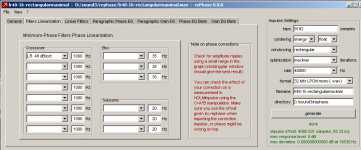
And various combinations of settings; all produced ringing.
Real point is filter mismatch and degree to which it impacts results with convolution engine. Allpass filter generated with Cool Edit convolved with time reversal of itself produces clean Dirac, likewise rephase linearization filter convolved with time reversal of itself produces clean Dirac.
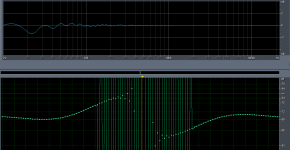
When rephase Linkwitz-Riley 48dB/octave 1kHz linearization filter is convolved with Cool Edit Linkwitz-Riley 48dB/octave 1kHz allpass filter, the slight mismatch appears like this:
(click to enlarge)
I've seen similar results in past when filters recovered from DCX2496 are convolved with time reversed filters generated with Cool Edit.
On the other hand,when correction filters are generated by mathematically derived inverse transfer function of measured responses, very controlled results are possible.
Regards,
Andrew
And various combinations of settings; all produced ringing.
Real point is filter mismatch and degree to which it impacts results with convolution engine. Allpass filter generated with Cool Edit convolved with time reversal of itself produces clean Dirac, likewise rephase linearization filter convolved with time reversal of itself produces clean Dirac.
When rephase Linkwitz-Riley 48dB/octave 1kHz linearization filter is convolved with Cool Edit Linkwitz-Riley 48dB/octave 1kHz allpass filter, the slight mismatch appears like this:
(click to enlarge)
I've seen similar results in past when filters recovered from DCX2496 are convolved with time reversed filters generated with Cool Edit.
On the other hand,when correction filters are generated by mathematically derived inverse transfer function of measured responses, very controlled results are possible.
Regards,
Andrew
Hello Andrew,
I was indeed able to reproduce what you got:
I generated a LR48 dB/oct at 1khz with rephase (LR48 in FIR section, and LR48 linearization in time=inv mode) and did the same with cool edit (2 4th order butterworth cascaded on a dirac).
The impulse generated by rephase has some ringing that the one generated by cool edit does not have.
In fact the impulse generated by rephase has more ringing on the left of the impulse, but the impulse generated by cool edit has more ringing of the right side (which is normal I suppose?).
Thank you for bringing that up. This might be due to some 32bit rounding in the FFT engine, I will see how this can be improved.
The impact should be quite limited though: this ringing is very low in level (already much lower than what it was in rephase 0.8.4, thanks to the fractional sample centering) and is at the Nyquist frequency.
I was indeed able to reproduce what you got:
I generated a LR48 dB/oct at 1khz with rephase (LR48 in FIR section, and LR48 linearization in time=inv mode) and did the same with cool edit (2 4th order butterworth cascaded on a dirac).
The impulse generated by rephase has some ringing that the one generated by cool edit does not have.
In fact the impulse generated by rephase has more ringing on the left of the impulse, but the impulse generated by cool edit has more ringing of the right side (which is normal I suppose?).
Thank you for bringing that up. This might be due to some 32bit rounding in the FFT engine, I will see how this can be improved.
The impact should be quite limited though: this ringing is very low in level (already much lower than what it was in rephase 0.8.4, thanks to the fractional sample centering) and is at the Nyquist frequency.
Last edited:
by the way, version 0.9.1 was uploaded to sourceforge shorly after version 0.9.0 (~13 hours ago), because some bugs had been introduced:
namely, the 'int' centering behavior (emulating the centering of rephase 0.8.4) was not working, and impulse offset was always a fractional sample...
Code:
0.9.1  2012-10-29
    - centering 'int' option was not working, this is now fixed
    - more explicit error message when loading a wrong setting file
namely, the 'int' centering behavior (emulating the centering of rephase 0.8.4) was not working, and impulse offset was always a fractional sample...
......cool edit has more ringing of the right side (which is normal I suppose?).
Cool Edit Pro2.1 running on XP SP2: LR 48dB/octave generated starting with Dirac produces all zero to left of causal Dirac, when waveform is reversed in time all zeroes appear to right. I start with stereo Dirac, apply HP Butterworth 4th order twice to left track, and apply LP Butterworth 4th order twice to right track, both tracks are then summed producing all-pass result with non zero values spanning 2101 samples (48kHz sample rate):
Normal time order:
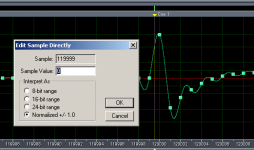
Final sample:
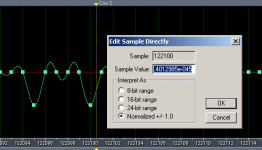
Convolution of the 2101 sample filter with a time reversed copy yields:
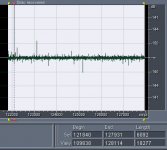
Convolution is Aurora plugin, applied with 0 scaling or DC correction. Recovered Dicac has normalized value of one. Total math has been done on 6092 samples as apparent in above picture.
Andrew
rePhase 0.9.2 is online
Download: rePhase on sourceforge
Download: rePhase on sourceforge
Code:
0.9.2  2012-11-04
    - added back '24bit LPCM mono' output format, missing since 0.9.0
    - improved up/down key bindings on frequency entries
    - added up/down key bindings for taps entry, with color warnings for
      extreme values
    - new '1st order' and '2nd order' linear-phase filters, meant to be
      combined with an existing (and already corrected in phase) rolloff
      to obtain a linear-phase acoustical Linkwitz-Riley filter
    - made sure 'middle'+'float' centering ends up within -0.5/+0.5 sample
      from middle (was -1/+0.5)
Last edited:
Hi Pos,
Most probably a very stupid question..... So be kind.
Can I use this to get linear phase improvements in my DCX software? If yes, how?
Thank you
Peter
Most probably a very stupid question..... So be kind.
Can I use this to get linear phase improvements in my DCX software? If yes, how?
You can use rePhase to linearize passive loudspeakers, active ones, and turn IIR active crossovers into linear-phase crossovers (turn a DCX2496 into a DEQX or a Dolby Lake 😉 ).
[/code]
Thank you
Peter
Hi Peter,
Not a stupid question at all, and in fact I am really sorry I did not write any documentation for this software 🙁
First, the comparison between the DCX and the Dolby Lake was a bit of a joke: you *can* obtain a linear phase filter (and acoustical response) with a DCX and rephase, but you will never get the audio quality (better DACs, better filtering algorithms, etc..) and power (brickwall filters, arbitrary slopes and eq, ...) of a Lake with a DCX.
Still, you will indeed be able to linearize the phase shifts introduced by the IIR filters in the DCX (and drivers/box) with rephase, and get good results (especially if you have crossover points under 1khz, which are more sensitive to phase shifts).
To do so you will only need to dial the filters you are using in your DCX in the "filter linearization" tab in rePhase, and generate an impulse for these (ideally you will want to dial your acoustical filters, not only the electrical ones...).
This is similar to phase arbitrator (which happen to have a user manual 😉 )
Then in order to use the generated convolution (carrying your phase correction), you will need to find a way to introduce a convolution engine in you audio chain, before the DCX.
If your source is a PC (or Mac) then it should be easy enough: there is a lot a convolution plugin that you can use, depending on your favorite audio player).
If you do not use a PC things will be more difficult: you will have to introduce a piece of hardware to do the convolution.
The minidsp openDRC is currently the only device (that I am aware of) that can do such convolutions.
Not a stupid question at all, and in fact I am really sorry I did not write any documentation for this software 🙁
First, the comparison between the DCX and the Dolby Lake was a bit of a joke: you *can* obtain a linear phase filter (and acoustical response) with a DCX and rephase, but you will never get the audio quality (better DACs, better filtering algorithms, etc..) and power (brickwall filters, arbitrary slopes and eq, ...) of a Lake with a DCX.
Still, you will indeed be able to linearize the phase shifts introduced by the IIR filters in the DCX (and drivers/box) with rephase, and get good results (especially if you have crossover points under 1khz, which are more sensitive to phase shifts).
To do so you will only need to dial the filters you are using in your DCX in the "filter linearization" tab in rePhase, and generate an impulse for these (ideally you will want to dial your acoustical filters, not only the electrical ones...).
This is similar to phase arbitrator (which happen to have a user manual 😉 )
Then in order to use the generated convolution (carrying your phase correction), you will need to find a way to introduce a convolution engine in you audio chain, before the DCX.
If your source is a PC (or Mac) then it should be easy enough: there is a lot a convolution plugin that you can use, depending on your favorite audio player).
If you do not use a PC things will be more difficult: you will have to introduce a piece of hardware to do the convolution.
The minidsp openDRC is currently the only device (that I am aware of) that can do such convolutions.
Last edited:
Thank you
Thank you for the reply,
I am using a mac as source, and a heavily modified DCX. So I will be playing around this Xmass with your software!!
Merci
Peter
Thank you for the reply,
I am using a mac as source, and a heavily modified DCX. So I will be playing around this Xmass with your software!!
Merci
Peter

- Home
- Design & Build
- Software Tools
- rePhase, a loudspeaker phase linearization, EQ and FIR filtering tool