
I have a newer version of this board V1.7. I'm not sure of the differences but there are 2 small dip switches on this version.
I also fitted OPA827 and LT1364 Opamps.
It's the same board as I have. The DIP switches are hidden in my photo by the Tenor USB board. Have you done any listening or testing yet?
Can you recheck the components values on board ?
Yes, and there are some discrepancies. I copied and modified your output schematic to match what I found:
http://www.circuitlab.com/circuit/9q6985/dac5-wm8751-output-as-built/
I ran the RMAA tests and found striking differences between having the DIP switches ON or OFF. Things look better with them ON for me. In both cases, I'm using the Tenor USB interface.
RightMark Audio Analyzer test: comparison
RightMark Audio Analyzer test: comparison
I plotted the data of the test square waves on the CD. These plots show that the square wave data was passed through a low pass filter around 20 KHz before being written to the CD. The waveforms I'm getting from my DAC5 aren't too far away from the CD data.
I still wonder, though, why the 1KHz square wave from the DAC5 seems to have tilted tops and bottoms.
1KHz Plot
5 KHz Plot
I still wonder, though, why the 1KHz square wave from the DAC5 seems to have tilted tops and bottoms.
1KHz Plot
An externally hosted image should be here but it was not working when we last tested it.
5 KHz Plot
An externally hosted image should be here but it was not working when we last tested it.
Last edited:

I think I should not post the schematic to a public forum without permission from WEILIANG.
I was curious about the DIP switches, so I did a little more investigation. SW1 is connected to pin 22 of the WM8741. When the switch is open, pin 22 is high; when closed, pin 22 is low. This controls the oversampling rate. It also seems to affect which digital filter is selected in the WM8741. At the low oversampling rate (switch closed), a "Linear phase half-band filter for backward compatibility" filter is used. At the high oversampling rate (switch open), a "Linear phase 'soft-knee' filter" is used. For more details, see the WM8741 data sheet.
This seems to explain the differences measured through RMAA with the switches in the two different positions.
Dave
SW2 does not seem to be connected to anything, so I guess it is there for mechanical support.
I was curious about the DIP switches, so I did a little more investigation. SW1 is connected to pin 22 of the WM8741. When the switch is open, pin 22 is high; when closed, pin 22 is low. This controls the oversampling rate. It also seems to affect which digital filter is selected in the WM8741. At the low oversampling rate (switch closed), a "Linear phase half-band filter for backward compatibility" filter is used. At the high oversampling rate (switch open), a "Linear phase 'soft-knee' filter" is used. For more details, see the WM8741 data sheet.
This seems to explain the differences measured through RMAA with the switches in the two different positions.
Dave
SW2 does not seem to be connected to anything, so I guess it is there for mechanical support.

I think I should not post the schematic to a public forum without permission from WEILIANG.
<snip>

 Thank You!

I recently bought a WEILIANG DAC5 from China.
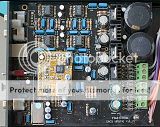
It sounds quite nice to me, but I expected better-looking square wave outputs from the MFSL test CD square wave tracks. I used a Win7-64bit machine and standard Windows drivers to drive the USB input to the Tenor TE7022 board, which, in turn, I think, drives the DAC5 via I2S.
1 KHz square wave as seen on my old 100MHZ Tektronix 454 scope at the phono connector output:

and 5KHz square wave:

I've never played with DACs before, but I think there must be some problems with this DAC. Can anyone with more familiarity with DACs give me a clue what might cause such distorted wave forms?
Dave


Perhaps, this was already mentioned somewhere in this thread, but the tilt evident in the 1KHz squarewave simply looks like a scope probe calibration issue. The ringing on the tops and bottoms of the waveform is normal, being produced by a linear phase brickwall interpolation filter. The 5kHz squarewave simply looks like the harmonics (everything above the 3rd) have been removed, which they would be by the brickwall filter. The only reason why one would apply a squarewave to a DAC is to view the time domain response, which appear normal in your photos to me. I may be missing something but, I don't see anything wrong with either waveform other than your scope probe may need calibration.
Last edited:
anyone knows what this means ?
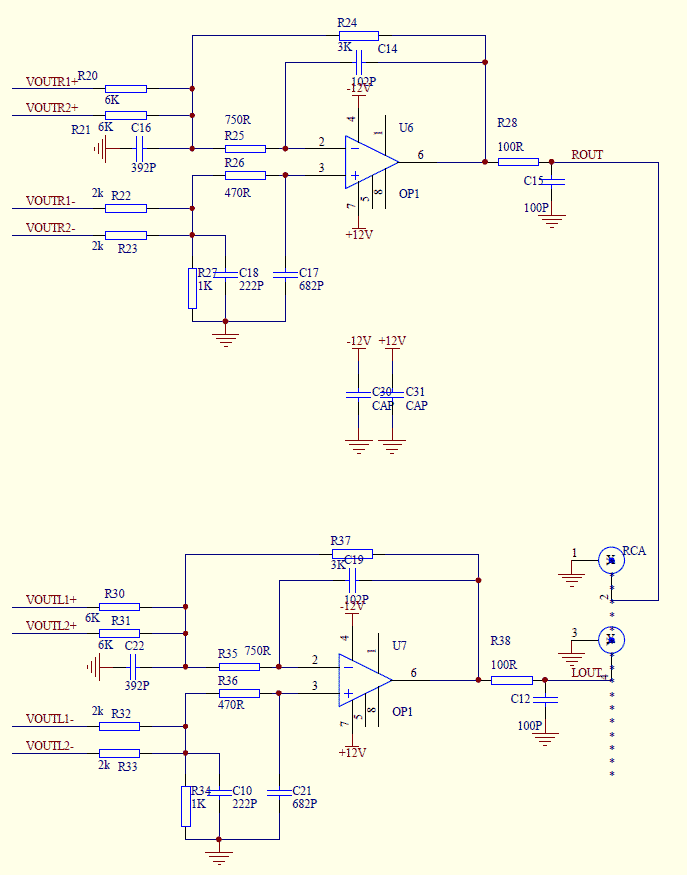
"Version1.9 add the DC servo circuit and the Second LPF circuit is Class A current output. 4 opamps upgrade into 2 opamps"
I'm quite sure that only one dual op-amp is being used in the new version instead of one dual plus two singles. Maybe something like this:
Last edited:
Regarding the interpretation of square wave response I have always found this this site Waveform Analysis to be helpful with the basics. See Fig.1 D
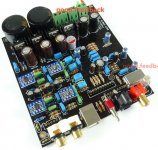
Hello Folks, I have a problem with a version of this design on the most basic level. I bought this kit from a vendor named good.feedback on eBay. After waiting almost eight weeks the package arrived with most of the resistors missing. They did arrive within a week or so but some still don't match up. It appears today the vendor has basically disappeared before I could get things in order and receive the docs and schematic I requested.
So I'm hoping someone (from the photos) can tell me the correct values (ohm & wattage ) for the missing resistors based on their position and/or adjacent parts. From what I can find there are at least three versions of this DAC and I'm hoping there is enough knowledge around to prevent this project becoming a lost cause.
Thanks in advance.....
So I'm hoping someone (from the photos) can tell me the correct values (ohm & wattage ) for the missing resistors based on their position and/or adjacent parts. From what I can find there are at least three versions of this DAC and I'm hoping there is enough knowledge around to prevent this project becoming a lost cause.
Thanks in advance.....
Attachments
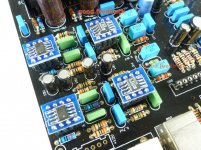
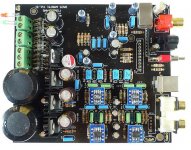
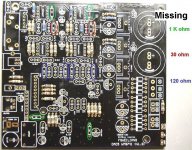
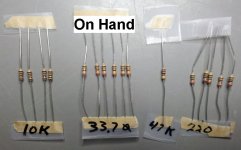


All the resistors on my board look as if they're 1% metal film 1/8 watt.
Are all the capacitors, semiconductors, etc. missing also, as your photo seems to show?
I suspect this Taobao storefront might be closely associated with Weiliang:
Google Translate
They say they provide tech support, but they didn't respond to me when I sent them an email. If I had written in Chinese instead of English, I might have had better luck.
I can send you hi-res photos of my board if that would help.
Thank you, Rodeodave, for your suggestion regarding square waves. It does look as if my waveform is close to the one that shows high-freq problems. It is not the scope probe calibration causing my strange waveform. I was sure to check probe calibration before I shot the photos. I'll see if I can find any of the references the author provides.
Are all the capacitors, semiconductors, etc. missing also, as your photo seems to show?
I suspect this Taobao storefront might be closely associated with Weiliang:
Google Translate
They say they provide tech support, but they didn't respond to me when I sent them an email. If I had written in Chinese instead of English, I might have had better luck.
I can send you hi-res photos of my board if that would help.
Thank you, Rodeodave, for your suggestion regarding square waves. It does look as if my waveform is close to the one that shows high-freq problems. It is not the scope probe calibration causing my strange waveform. I was sure to check probe calibration before I shot the photos. I'll see if I can find any of the references the author provides.
I bought a finished board from good.feedback about a year ago. It was a good experience. At the time, he disappeared a few days, as his wife got a baby the day I placed my order. Maybe another baby coming
I finally bought DAC6, the USB input only version with TE7022 + WM8741, on ebay from minishow0328. It's a finished board, not available as a kit.
He is not the cheapest vendor, but english communication was excellent with Yao. Shipment with tracking number.
It arrived today. Excellent packing, very safe, and only 12 days to from Singapore to France, delivery against signature
He does not have the DAC6 v1.0 schematic and said Weiliang does not want to share it I'll have to reverse engineer the schematic from board.
This board has only one dual opamp at the output, OPA2134 despite ebay description says AD827, probably for unbalancing.
A first glance at the boad shows excellent built quality. The board is yellow now. Caps are Elna Silmic, smaller ones are Elna SilmicII. Sanyo Oscon, Wima mks and MKP in the output area.
Main filtering caps are Samwha 4700uF/35V . Never heard before about these caps. I had terrible experience with some chinese caps. These are Korean. Anyone knows how good they are ?
BTW, for those interested in USB, it seems the default windows driver has some issues with TE7022.
The latest version of driver can be downloaded from this link
ÉÙ˧ÒôÏì-ÏÂÔØÖÐÐÄ-TeraLink-X2 USB Audio Ö§³ÖWIN7-64λϵͳ
I finally bought DAC6, the USB input only version with TE7022 + WM8741, on ebay from minishow0328. It's a finished board, not available as a kit.
He is not the cheapest vendor, but english communication was excellent with Yao. Shipment with tracking number.
It arrived today. Excellent packing, very safe, and only 12 days to from Singapore to France, delivery against signature
He does not have the DAC6 v1.0 schematic and said Weiliang does not want to share it
I'll have to reverse engineer the schematic from board.This board has only one dual opamp at the output, OPA2134 despite ebay description says AD827, probably for unbalancing.
A first glance at the boad shows excellent built quality. The board is yellow now. Caps are Elna Silmic, smaller ones are Elna SilmicII. Sanyo Oscon, Wima mks and MKP in the output area.
Main filtering caps are Samwha 4700uF/35V . Never heard before about these caps. I had terrible experience with some chinese caps. These are Korean. Anyone knows how good they are ?
BTW, for those interested in USB, it seems the default windows driver has some issues with TE7022.
The latest version of driver can be downloaded from this link
ÉÙ˧ÒôÏì-ÏÂÔØÖÐÐÄ-TeraLink-X2 USB Audio Ö§³ÖWIN7-64λϵͳ
- Home
- Source & Line
- Digital Source
- WEILIANG DAC5 - WM8741 & Tenor TE7022